Selected Element - tab
The Selected Element tab opens the Action Panel that shows all the insights generated by the analytics for the selected element. The selected element is the one you selected on your Visualizer display (see Search Analytics Insights in this documentin the SFHub Studio Guide).
Grouped by - Selected Element
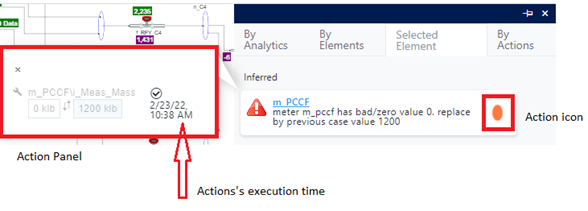
The following table provides descriptions for the Selected Element items.
| Item | Description |
|---|---|
 | The Action icon is visible whenever an actionable insight has been generated. |
| Action Panel | The Action Panel opens as soon as you hover your mouse over the action icon. The panel provides the details of the action. Double-clicking on the Action panel triggers its execution. |
| Action's execution time | The time in the Action Panel indicates that the action has already been executed. In such instances, if you hover your mouse over the Action Panel, the  "no mouse action available" icon appears. |
Note
Grouped by 'Selected Element' is not enabled when you are working with only a Report.