Component Table Configuration (Ports)
The Component Configuration for Ports window is used to select Attributes and retrieve data at the point when the values are being taken from the connected meters. Such functionality is useful if you need to calculate the composition at the outlet of a mixer (say a Sigmafine node) given the compositions available in the meters of the input streams.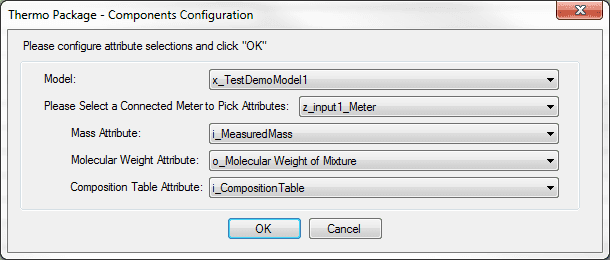
To select Attributes and retrieve data:
Click the Model down arrow and select which Model in the database you would like to use to view connections.
Click the Please Select a Connected Meter to Pick Attributes down arrow and select one of the meters.
This meter is only used to get a list of Attributes so that you can select the Attributes from which to pull data. Therefore, it is not saved in the configuration settings after clicking OK.
Click the Mass Attribute down arrow and select the Attribute to be used.
Note that only Attributes with a UOM of "kg" are available.
Click the Molecular Weight Attribute down arrow and select the Attribute to be used.
Note that only Attributes with a UOM of "kg/kmol" are available.
Click the Composition Table Attribute down arrow and select the Attribute to be used.
Note that only Attributes with a UOM of "\<None>" are available.
Click OK to save your selections and close the window.