Multi-Case File Format for Elements
To import data to Element Attributes in multiple cases, two additional columns need to be added for Start Time and End Tie of each Case to be loaded. The following applies to these two columns:
- The two columns should be between the 'Select(x)' and 'Name' columns.
- The cell format of these two columns must be in Date format in order for the Data Importer to automatically recognize that it is working with a multi-Case spreadsheet.
 EXAMPLE: Import file with Start Time and End Time columns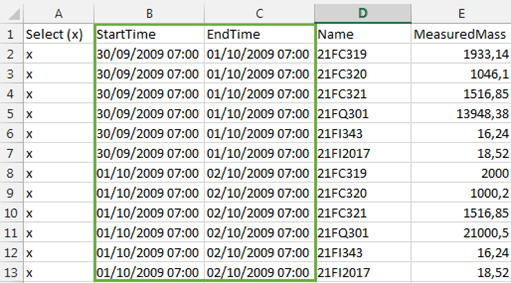
All the other columns can be set up according to the desired Attributes as described previously.
When the Data Importer is processing a multi-Case spreadsheet, the selected Case in the main window is ignored.