Signature File Generation
The SFHub Signature Generation window allows you to the machine signature file required by SigmafineHub.
To generate the signature file:
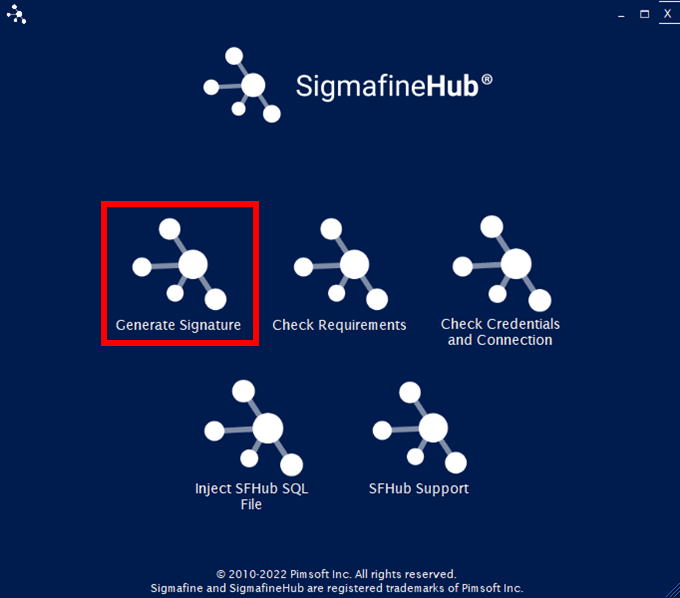
Click the Generate Signature option in the main window.
SFHub Utility App - select Generate Signature
The SFHub Signature Generation window opens.
SFHub Signature Generation window
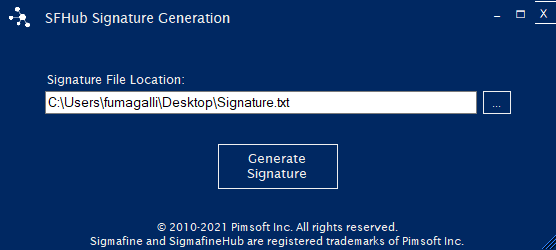
Click the 'Signature File Location'
 (ellipsis) button to open a
window that lets you can select the location to save the signature
file. After selecting the location and providing a file name, the
file path and name displays in the Signature File Location box (as
shown in the Figure 2 example).
(ellipsis) button to open a
window that lets you can select the location to save the signature
file. After selecting the location and providing a file name, the
file path and name displays in the Signature File Location box (as
shown in the Figure 2 example).Alternatively, you can type the full path and file name into the Signature File Location text box.
Click the Generate Signature button.
The Utility app creates or replaces the file specified in the Signature File Location Text box with the machine signature information (expressed as an encrypted string).
Click the Close button in the top right-hand corner, to close the window and return to the utility app main window.