SigmafineHub® Upgrade to version 3.x
SFHub 3.x is a major release and comes with significant changes. Therefore, if you are planning to upgrade an early version of SFHub to SFHub 3.x, here below you can find the suggested steps:
- Please refer to the SFHub Installation documentation
- Download the new SFHub 3.x setup kit
- Download the Display converter setup kit
- Make a backup of the SFHub database. This is recommended even if the SFHub upgrade preserves the SFHub database content.
- Uninstall the previous version of SFHub. (see Uninstall SigmafineHub for more details).
Uninstalling SFHub does not delete the SFHub database.
- Run the SFHub 3.x setup kit. (see Install SigmafineHub for more details).
- Upload the symbol libraries. (see )
- Install the new version of the Display Converter for PI Processbook.
- Re-Convert the PI Processbook display currently uploaded in your current version of SFHub.
- Upload the converted display.
The display format in SFHub 3.x has changed to support the display authoring and so your existing displays are no longer working in SFHub 3.x. Display uploaded by early version of SFHub must re-converted using the new version of the Display Converter for PI Processbook and then re-upload them in SFHub. In order to minimize the downtime of your SFHub system, you can prepare the new display files to be re- imported before proceeding with the SFHub 3.0 upgrade.
Notice that all customizations will be preserved .
Install the Display Converter for PI Processbook
Download from the Sigmafine SSP site the setup according to your PI ProcessBook version. Three setups are available:
- SFHub Display Converter Addin 3.x for PI Processbook 2014
- SFHub Display Converter Addin 3.x for PI Processbook 2015 R2
- SFHub Display Converter Addin 3.x for PI Processbook 2015 R3
Uninstall the current Display Converter, if any, from the computer hosting the PI ProcessBook application and install the new version. Now you are ready to convert your PI Processbook displays.
Convert the PI Processbook Displays
Once the new version of the Display Converter has been installed, you can proceed to re-convert each PI ProcessBook display previously uploaded on your SFHub installation. At this point you can upload the generated .imp files in SFHub 3.0 using the SFHub Admin application.
Upload SFHub Symbol Libraries
SFHub authoring makes available a set of graphic symbols you can use to build your Graphic Templates to be used by SFHub Authoring.
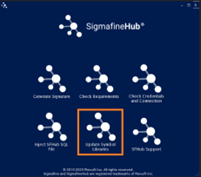
Run SigmafineHub Utility Application installed by the SFHub 3.0 setup kit and select the below item from the main menu.
Fill the right parameters to connect the SFHub sql database
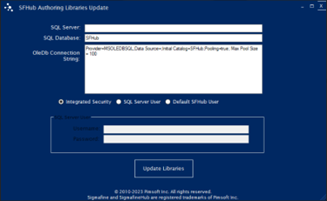
Click on Update Libraries. A confirmation message is shown.
