SigmafineHub® Architecture
SigmafineHub (aka SFHub) is a web Application Server that enables you to run your Sigmafine system. The main components of a SigmafineHub installation are:
SigmafineHub Architecture
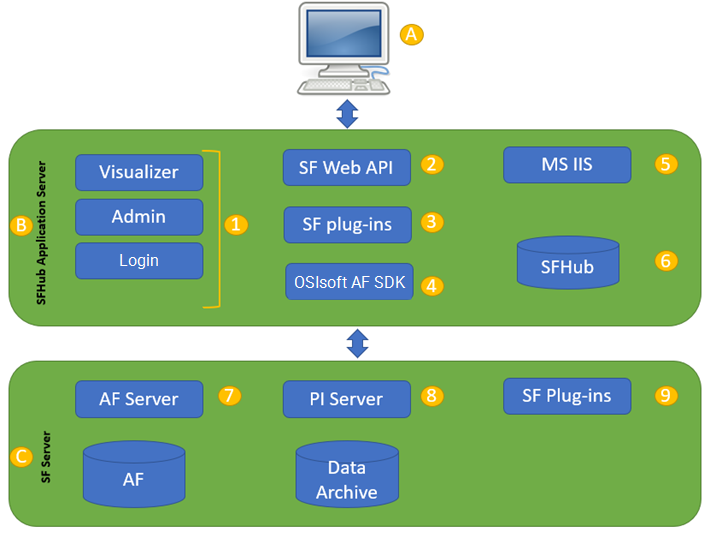
(A) Clients: Clients are individual SFHub Visualizer users accessing Sigmafine.
(B) SFHub application server: The application server provides the execution environment for SFHub Visualizer. The application server handles all application operations between users (clients) and Sigmafine Servers, Microsoft SQL Server, and SF WEB API.
- (1) SF WEB APPs: The pool of Sigmafine web applications consisting of standard web applications such as SFHub Visualizer, Admin and Login, and additional ones such as Studio.
- (2) SF WEB API: The SF WEB API provides cross-platform, multi-user access to SF Server.
- (3) SF plug-ins: the basic set of Sigmafine plug-ins.
- (4) OSIsoft AF SDK: The OSIsoft AF SDK client.
- (5) Microsoft IIS: SigmafineHub uses Microsoft IIS, that has to be installed on the Application Server.
- (6) SFHub: SigmafineHub stores displays, users, settings, and operational metadata into SQL Server.
(C) SF Server: Your existing Sigmafine Server that provides access to the Sigmafine functionality.
- (7) PI Asset Framework (PI AF): A component of the Sigmafine Server.
- (8) PI Server: A component of the Sigmafine Server.
- (9) SF plug-ins: The Sigmafine plug-ins.
We strongly recommend that the Microsoft SQL Server (5), hosting the SFHub database, is installed on the same computer as the SFHub Application Server (B). Otherwise, you can use a dedicated SQL Server installation, provided that a good connection is made available. As per OSIsoft recommendations, please ensure that SF Servers (PI AF Servers) are in the same domain as the SFHub Application Server and SQL Server is hosting the SFHub database.