SFCode Block Components
Ports
Every SFCode Block exposes from one to N connection ports. A Connection port can be of type top, bottom or inner; every connection port is polarized and enables the connection according to the following schema:
- TOP → can connect to BOTTOM and INNER
- INNER → can connect to TOP
- BOTTOM → can connect to TOP
Analytic Web Editor - Connection Ports

Name
SFCode Blocks require a name in the following instances, though it is always good practice to name all code blocks that provide a Name option.
Function SFCodeBlock: Name is used to assign the function name
Any SFCodeBlock referenced through a "GoTo" SFCodeBlock: The referenced SFCodeBlock must be assigned a name
Label (localization)
SFCodeBlock labels are localized according to your User profile settings.
Analytics Web Editor - Label (Localization)

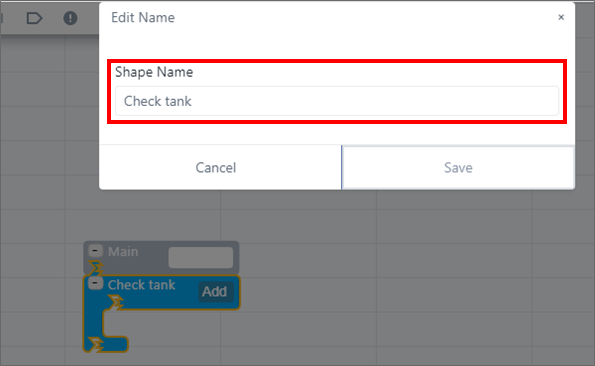
Assigning a label to a SFCodeBlock results in changing the label displayed. Attention, long names will be unreadable. In the following figure, the IF Then SFCodeBlock has been labeled 'Check tank'.
Assigning a label to SFCodeBlock
Configuration
Configuration refers to the logic you need to setup within a SFCode Block, such as an expression, a calculation, a print format, etc. It is set up through dedicated configuration panels. Depending on the SFCode Block you choose, it may or may not include a configuration (property) panel, as not all SFCode Blocks require configuration.
Examples of Code Blocks that do and don't require Configuration logic

Patterns
A pattern is a powerful feature that allows you to define different actions based on an element template. This helps you create complex analyses with a fairly minimum set of SFCodeBlocks. The majority of SFCode Blocks support multiple patterns.
Analytic Web Editor - Patterns

For additional information about SFCode Blocks, please see SFCodeBlock Behaviors.