Data Casting, Transformation and Formatting
The Data Casting, Transformation and Formatting service is shared across all the Integration Framework engine and objects. It provides very powerful, but simple types of manipulations for complex integrations. The service performs a two-step conversion of the data:
- STEP 1: Input data analysis and parsing
- STEP 2: Output data casting and formatting
The first step allows you to define the input data type and if needed, a regular expression to extract only the portion of data needed for the integration.
 EXAMPLES
In the following examples, we want to extract only the numeric part of the input data and present the result as a number.
Test functionality is available to test a sample input expression.
Example 1: Input and Parsing Service
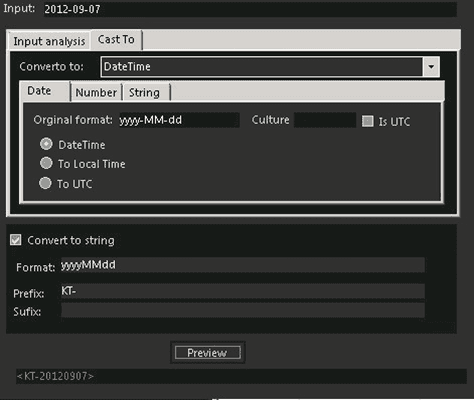
The second step allows you to define the casting output data (with appropriate format mask) and the destination format to be applied, before sending it to the destination system. Enhanced features are available for converting numbers, currencies and date/times types, as well as setting the culture (regional settings) and to adding prefixes/suffixes to the converted data. Preview functionality is available to test a sample input expression.
Example 2: Casting and Formatting Service