Bypass Category Checks
The Previous Value Data Reference requires the source attribute to be categorized under SF_CaseInputData. This ensures that the value pulled from the previous case is an input value, which is necessary for the data reference to function correctly.
Prior to SF 4.6, this restriction was not enforced. When migrating from an earlier version of the data reference or the Sigmafine system, this error may therefore appear due to missing category assignments on source attributes.
Resolving this properly requires either creating the necessary input results before migrating, or recategorizing the source attribute � which may involve repeating the Collect Inputs step for affected cases.
If adapting existing cases to meet this requirement is not feasible, the data reference can be configured to bypass the category check for the source attribute. Note that this bypass requires a manual review of your data reference configurations to ensure no loops are i ntroduced in your system.
To enable the bypass, add the following configuration to the SigmafineConfig database:
- Verify that the SigmafineConfig database exists in your system. If it does not, create it.
- Create an element named Pimsoft in the SigmafineConfig database.
- Add a child element named Plug-ins under the Pimsoft element.
- Add a child element named Previous Value under the Plug-ins element.
- Add a Boolean attribute named Bypass under the Previous Value element.
- Set the Bypass attribute to True to enable the bypass.
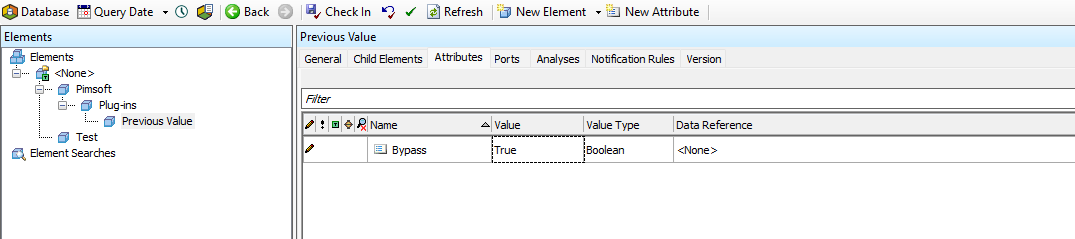
Since this configuration setting is lazy-loaded, you need to restart all the Sigmafine applications at the end of the settings creation process:
- PI System Explorer
- Sigmafine Scheduler
- Sigmafine SQL Access
- Sigmafine Integration Framework
From this point on, the Previous Value Data Reference will bypass the category check for the source attribute and the error will no longer occur.