Configure User Rights
Users who have been registered on SigmafineHub® do not have access to any applications until you configure their account. By configuring a user's account, you are telling SFHub which applications a user can access and what rights they have in that application. The configuration settings can be edited at any point in time, if you need to change a user's access or application rights. Both tasks are accomplished using the following steps.
To configure a user's rights in SFHub:
Log into SFHub as an Administrator.
Click the SigmafineHub® Admin application block to open the SFHub Admin application.
Click the
 User
Settings icon to open the User Settings panel.
User
Settings icon to open the User Settings panel.SFHub Admin - User Settings panel
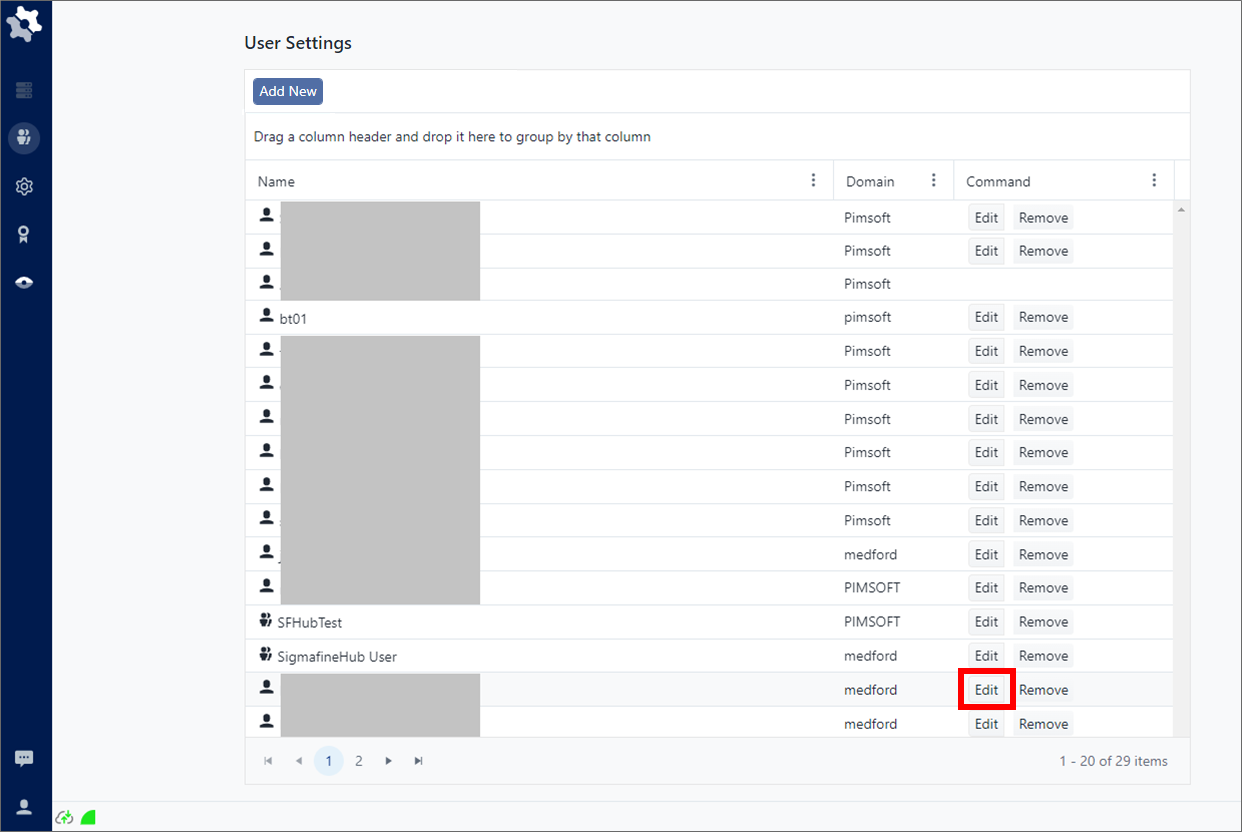
Locate the user name or group name you need to edit the permissions over the SFHub application.
Click the Edit button.
A configure user panel opens that allows you to select the applications the user is allowed to access, and the rights in each application.
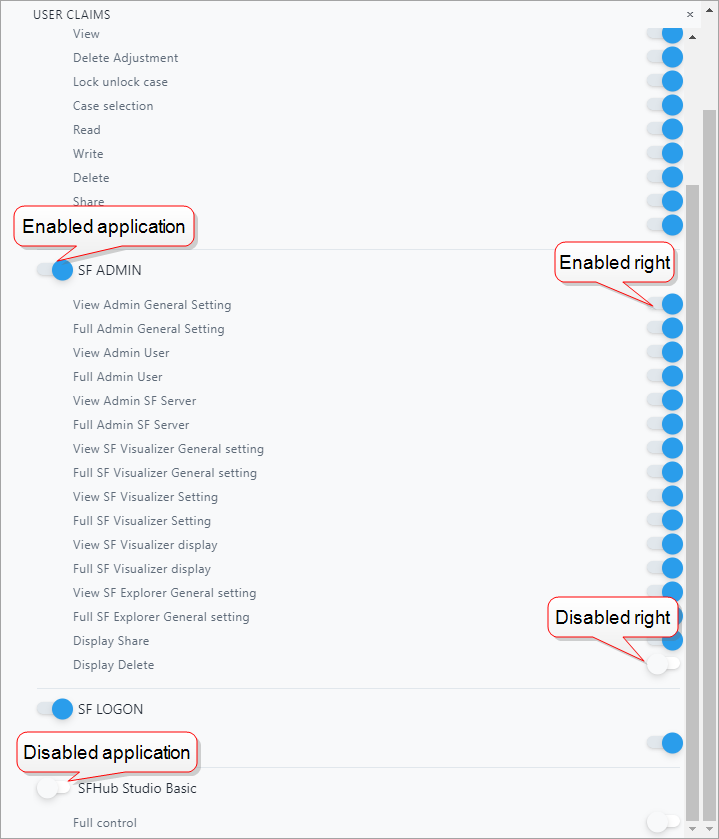
To allow access to an application, click on the
 white dot.
The dot slides to the right and turns blue
 ,
indicating that the setting is enabled for the user.
,
indicating that the setting is enabled for the user.To disable a user right in the application, click on the
blue dot.The dot slides to the left and turns white
,
indicating that the setting is disabled for the user.In Figure 2, we enabled this user's access to SFHub Visualizer and adjusted the rights according to what this user needs to be able to do within the SFHub Visualizer application. They are not an SFHub Administrator, so they do not require any access to the SFHub Admin application or its features.
Please use the following table to determine what settings to enable for the user.
When finished, either click anywhere outside of the panel, or click the x in the top left corner of the panel, to close it.
Repeat steps 4 through 9 for each user or group you need to configure.
All access rights assigned to a user for each SFHub application, ensure that the user can access the functionality of that application. However, the access rights do not guarantee that the user can actually operate on the SFHub Studio entity (Project, Analysis or Report), as this depends on whether the entity is owned by the user them self or if it has been shared by others.
Example
User 1 has the create and write access rights on SF Studio Analytics. This means that the User 1 can modify existing analytics or create new ones. If User 1 is not the owner of some of the analytics, and those analytics are not public or are not write shared with User 1, then User 1 is not allowed to modify them. User 1 can only modify owned or public analytics, or analytics that are write shared with User 1.
SFHub Visualizer
Controls a user's access to the SFHub Visualizer application.
| Access Rights | Description |
|---|---|
| Configure SFHub Visualizer | Determines whether or not the user can configure display settings in SFHub Visualizer. |
| Delete Case | Determines whether or not the user is allowed to delete a case. |
| Create Case | Determines whether or not the user is allowed to create a case. |
| Run Case | Determines whether or not the user is allowed to run a case analysis. |
| Add Adjustment | Determines whether or not the user is allowed to make an adjustment to an attribute. |
| View | Determines whether or not the user is allowed to view a Display in the SFHub Visualizer application. |
| Delete Adjustment | Determines whether or not the user is allowed to delete an attribute adjustment they had added. |
| Lock unlock case | Determines whether or not the user is allowed to lock and unlock a case. |
| Case selection | Determines whether or not the user is allowed to select cases in the application. |
| Display Edit | Determines whether or not the user is allowed to open a generic display in authoring. |
| AF Edit | Determines whether or not the user is allowed to open and edit a Sigmafine display in authoring. |
| Symbol Library Create | Determines whether or not the user is allowed to create a symbols library. |
| Symbol Library Edit | Determines whether or not the user is allowed to modify a symbols library. |
| Global Standard GT | Determines whether or not the user is allowed to promote a Symbol Library as Global Symbol Library |
SFHub Admin
Controls a user's access to the Sigmafine Admin application.
| Access Rights | Description |
|---|---|
| View Admin General Settings | Determines whether or not the user is allowed to view the general administration settings. |
| Full Admin General Settings | Determines whether or not the user is allowed to modify the general administration settings. |
| View Admin User | Determines whether or not the user is allowed to view the configurations of all users who have administration rights in SFHub. |
| Full Admin User | Determines whether or not the user is allowed to modify the configurations of any user who has administration rights in SFHub. |
| View Admin SF Server | Determines whether or not the user is allowed to view all the SF Servers that have been associated with SFHub. |
| Full Admin SF Server | Determines whether or not the user is allowed to modify the association of any SF Server that has been associated with SFHub. |
| View SF Visualizer General setting | Determines whether or not the user is allowed to view the general setting for SFHub Visualizer. |
| Full SF Visualizer General setting | Determines whether or not the user is allowed to modify the general setting for SFHub Visualizer. |
| View SF Visualizer Setting | Determines whether or not the user is allowed to view the SFHub Visualizer settings. |
| Full SF Visualizer Setting | Determines whether or not the user is allowed to modify the SFHub Visualizer settings. |
| View SF Visualizer display | Determines whether or not the user is allowed to view the SFHub Visualizer display panel. |
| Full SF Visualizer display | Determines whether or not the user is allowed to modify certain aspects of the SFHub Visualizer display panel. |
| View SF Explorer General setting | Determines whether or not the user is allowed to view the general setting for SF Explorer. |
| Full SF Explorer General setting | Determines whether or not the user is allowed to modify certain aspects of the SF Explorer general setting. |
| Display Share | Determines whether or not the user is allowed to share displays. |
| Display Delete | Determines whether or not the user is allowed to delete displays. |
SFHub Explorer
Controls a user's access to the Sigmafine SF Explorer application.
| Access Rights | Description |
|---|---|
| View | Determines whether or not the user is allowed to view the SF Explorer application. |
| Configure SF Explorer | Determines whether or not the user is allowed to modify certain aspects of the SF Explorer application. |
Controls a user's access to the SFHub.
| Access Rights | Description |
|---|---|
| Admin | Determines whether or not the user's user name is recognized as an Administrator on SFHub. |
SFHub Studio Basic
Controls a user's access to the SigmafineHub Studio applications.
| Access Rights | Description |
|---|---|
| Full Control | Determines whether or not the user is allowed to view register or unregister SFHub Studio packages. |
SFHub Studio
Controls a user's access to the SigmafineHub Studio application.
Please do not configure any SF Studio Analytics, SF Studio Report rights on SFHub versions earlier to 3.0.4.
| Access Rights | Description |
|---|---|
| List | Determines whether or not the user is allowed to view or list the SFHub Studio Projects. |
| Read | Determines whether or not the user is allowed to open in read-only the SFHub Studio Projects. |
| Write | Determines whether or not the user is allowed to open and modify the SFHub Studio Projects. |
| Delete | Determines whether or not the user is allowed to delete the SFHub Studio Projects. |
| Share | Determines whether or not the user is allowed to share the SFHub Studio Projects. |
| Create | Determines whether or not the user is allowed to create SFHub Studio Projects. |
| Package List | Determines whether or not the user is allowed to list the SFHub Studio Packages. |
| Package Build | Determines whether or not the user is allowed to build SFHub Studio Packages. |
| Package Admin | Determines whether or not the user is allowed to manage Workflows and Severities. |
| Package Register | Determines whether or not the user is allowed to register SFHub Studio Packages. (Pacakge List access right must be granted as well). |
| Package Unregister | Determines whether or not the user is allowed to unregister SFHub Studio Packages. (Pacakge List access right must be granted as well). |
| Package Create | Determines whether or not the user is allowed to create SFHub Studio Packages. (Pacakge List access right must be granted as well). |
SFHub Studio Analytic
Controls a user's access to the SigmafineHub Studio Analytics application.
| Access Rights | Description |
|---|---|
| Full Control | Determines whether or not the user is allowed to list read, write execute, delete share, and create a SFHub Studio Analytic. |
| List | Determines whether or not the user is allowed to view or list the SFHub Studio Analytics. |
| Execute | Determines whether or not the user is allowed to execute SFHub Studio Analytics. |
| Read | Determines whether or not the user is allowed to open in read-only SFHub Studio Analytics. |
| Write | Determines whether or not the user is allowed to open and modify SFHub Studio Analytics. |
| Delete | Determines whether or not the user is allowed to delete the SFHub Studio Analytics. |
| Share | Determines whether or not the user is allowed to share SFHub Studio Analytics. |
| Create | Determines whether or not the user is allowed to create new SFHub Studio Analytics. |
SFHub Studio Report & Dashboards
Controls a user's access to the SigmafineHub Studio Report application.
| Access Rights | Description |
|---|---|
| Full Control | Determines whether or not the user is allowed to list, read, write, execute, delete, share, and create a SFHub Studio Reports. |
| List | Determines whether or not the user is allowed to view or list the SFHub Studio Reports. |
| Execute | Determines whether or not the user is allowed to execute the SFHub Studio Reports. |
| Read | Determines whether or not the user is allowed to open in read-only SFHub Studio Reports. |
| Write | Determines whether or not the user is allowed to open and modify the SFHub Studio Reports. |
| Delete | Determines whether or not the user is allowed to delete SFHub Studio Reports. |
| Share | Determines whether or not the user is allowed to share SFHub Studio Reports. |
| Create | Determines whether or not the user is allowed to create new SFHub Studio Reports. |