View or Change Sigmafine Server Communication Settings
SigmafineHub Admin users can use the Sigmafine Server Communication Settings panel on the System info page, to view or change Sigmafine Server communication setting parameters.
This is the timeout (in seconds) required by the user session on the SFHub Application Server, to connect the Sigmafine Server referenced by the display.
To view or change Sigmafine Server communication settings:
Log into SigmafineHub Admin.
Click the
 System info icon.
The System info page opens.
System info page
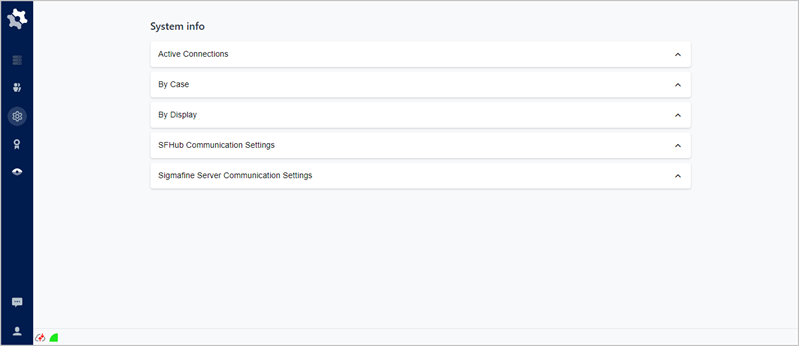
Click on Sigmafine Server Communications Settings to open the panel.
Sigmafine Server Communications Settings panel
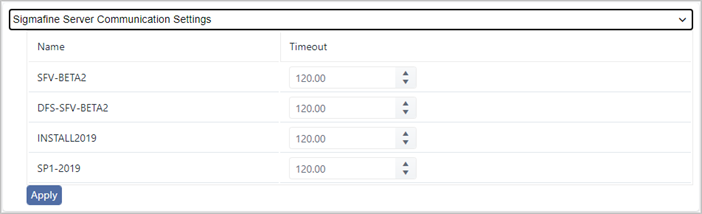
The Sigmafine Server Communications Settings panel provides the following information.
Sigmafine Server Communications Settings Panel Descriptions
Item Description Name Shows the name of the Sigmafine Server. Timeout Indicates the timeout (in seconds) required by the Sigmafine Server, to establish the connection with the SFHub Application Server.
The tuning of this value depends on the network performance between the SFHub Application Server and the Sigmafine Server.
(Optional) Timeout: Type or use the up/down arrows to change the seconds a communication connection stays open before it times out for a specific server.
noteThe tuning of this value depends on the network performance between the SFHub Application Server and the Sigmafine Server.
Click Apply to save any changes you have made.
When finished, click Sigmafine Server Communications Settings or click its [Ú]{style="font-family: 'Symbol'; font-weight: bold;"} icon, to close (collapse) the panel.