View SFHub Communication Settings
SigmafineHub Admin users can use the SFHub Communication Settings panel on the System info page, to view or change SFHub communication settings parameters.
To view or change the SFHub Communication settings:
Log into SigmafineHub Admin.
Click the
 System info icon.
The System info page opens.
System info page
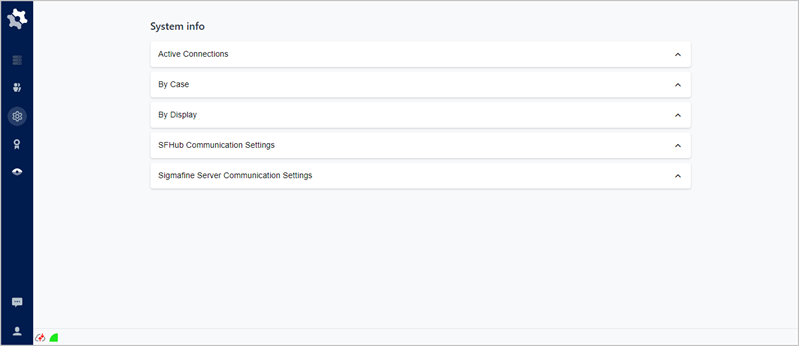
Click on SFHub Communications Settings to open the panel.
SFHub Communications Settings panel
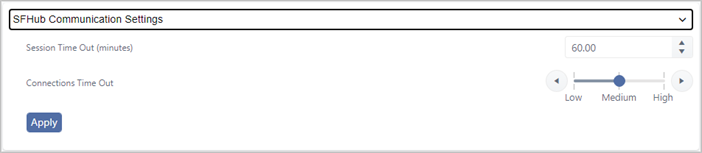
The SFHub Communications Settings panel provides the following information.
SFHub Communications Settings Panel Descriptions
Item Description Session Timeout (minutes) Shows the browser session inactivity timeout in minutes. Connections Time Out Indicates the time out required by the browser session, to establish the connection with the SFHub Application Server. (Optional) Session Time Out: Type or use the up/down arrows to change the minutes a session stays open before it times out.
(Optional) Connections Time Out: Move the slider left or right to decrease or increase the length of the time out in minutes. You can also use the left and right circled arrows to move between Low, Medium and High. It is good practice to select Low, Medium or High according to the network bandwidth and Latency between the browser and the SFHub Application Server. Typically this parameter needs to be increased whenever users experience issues establishing the connection to the SFHub Application Server from the browser.
Click Apply to save any changes you have made.
When finished, click SFHub Communications Settings or click its X icon, to close (collapse) the panel.