View Connections By Case
SigmafineHub Admin users can use the By Case panel on the System info page, view the list of the SFHub Applications currently working on a Sigmafine Case.
SFHub Visualizer is basically a subset of the information shown by the Connections by Display.
To view by case:
Log into SigmafineHub Admin.
Click the
 System info icon.
The System info page opens.
System info page
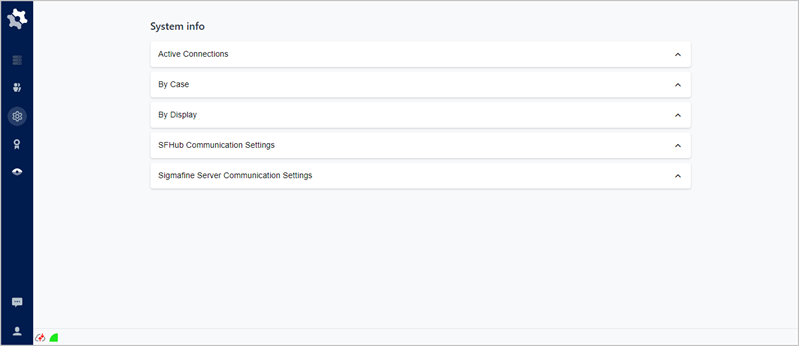
Click on By Case to open the panel.
By Case panel
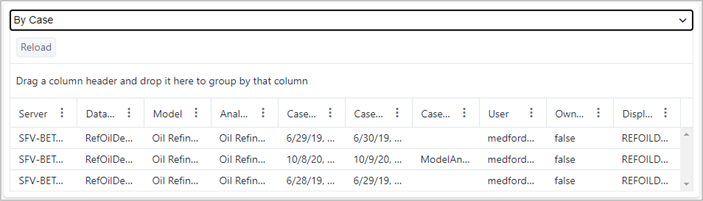
The By Case panel provides the following information.
By Case Panel Descriptions
Item Description Server The name of the Sigmafine Server to which the Case is connected. Database The name of the Sigmafine database to which the Case is connected. Model The name of the Sigmafine model to which the Case is connected. AnalysisName The name of the Sigmafine analysis to which the Sigmafine Case is connected. CaseStart The start date of the Sigmafine Case. CaseEnd The end date of the Sigmafine Case. Casename The name assigned to the Case (it might be an empty string, since it is not mandatory). User The SFHub username of the person working on the Case. Owned A Boolean value that indicates whether the user is the owner of the Sigmafine Case (the Case that is currently checked out by the user). DisplayName The name of the Case currently opened by the user. When finished, click By Case or click its icon, to close the panel.