Analyzer
The analyzer is the source of manual inputs or measurement data coming from an external source. The following Attributes need to be added to the Analyzer template: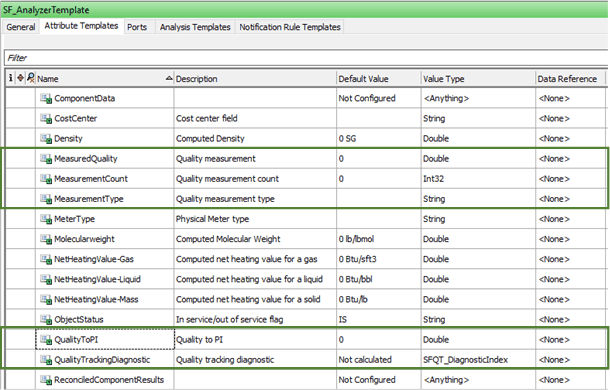
Measurement Type [Input]: An Attribute where the name of the measured quality is specified (e.g. D15, V40, SUL, …). The name must be the same as the one defined in the Quality Table and in the Material table (in the next chapter details about these tables are provided).
Measured Analysis [Input]: An Attribute that contains the value of the measured quality, which is typically linked to a PI point via PI Point data reference.
Measurement Count [Input]: An Attribute that contains the number of measurements for the active case (e.g. In a Case from 8:00AM to 9:00AM, for the given quality, a PI tag contains a value at 8:15AM and another at 8:40AM. The measurement count will be 2 since there are two available measurements). If there is at least one measurement, this value will be used also as result of the analysis, skipping any further calculation. If no measurement is available in the current case, the counter will be zero. Therefore, the analysis will not take into account any measured value for the active case, and quality will be calculated according to information available in the previous Case and according to the incoming flows.
If PI Point data reference is available, the following configuration can be used:
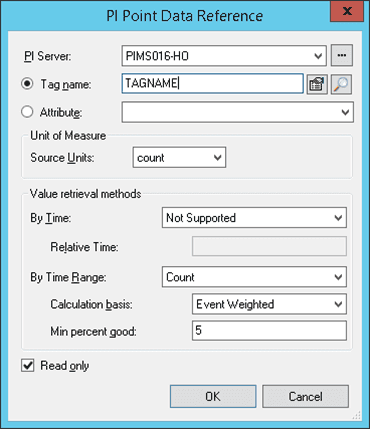
This configuration is translated in this string:
\\SERVERNAME\PITAG.PV;TimeMethod=TimeRange;RelativeTime=1;TimeRangeMethod=Count;TimeRangeBasis=EventWeighted;TimeRangeMinPercentGood=5;UOM=count
In the context of Sigmafine Case, this Attribute can also be used to manually drive the Quality Tracking analysis calculation:
If MeasurementCount is set manually to 0: The analysis will automatically discard the MeasuredAnalysis value and consider only the calculated value, which will be transferred to the tank QualityTrackingResults table.
If MeasurementCount is set manually to 1: The analysis will automatically discard the calculated value and consider only the MeasuredAnalysis value, which will be transferred to the tank QualityTrackingResults table.
Note: The MeasurementCount Attribute is significant only for the inventories to recognize that an updated value is available (e.g. from LIMS). In that case, the quality tracking will use this value to fill the quality results. If the analyzer is attached to a receipt point, the measurement count is not verified and, the last value from the analyzer will be used to track the quality of the incoming transfer or flow.
Quality_toPI [Output]: The analysis, after performing the calculations, writes back the final value of the quality in the appropriate source analyzer. So, this Attribute contains the result of the QualityCalculation analysis.
Quality Tracking Diagnostic [Output]: An optional Attribute where the analysis records the diagnostic error code for the analyzer. Details on the diagnostic error codes are provided in Configuring - Quality Tracking Analysis Rule.