Flows and Transfers
The flow template holds the results of quality tracking; therefore, the following QualityTrackingResults and GenealogyTrackingResults Attributes should be present:
- Quality Tracking Balance Flag [Input]: This attribute (type: Boolean) must be TRUE if quality tracking needs to be propagated through the current object (this flag is not required for Transfers).
- Genealogy Tracking Result [Output]: This Attribute is a data table providing the information about the packets’ incoming source and relative quantity and fraction. This Attribute will be filled in the initialization process.
- Quality Tracking Result [Output]: This Attribute is a data table providing the calculated qualities for each packet according to the specified unit of measure.
- Quality Tracking Material Result [Output]: This is an optional Attribute that records the data table providing the calculated qualities for each packet and for each material according to the specified unit of measure.
- Quality Diagnostic [Output]: This is an optional Attribute where the analysis records the diagnostic error code.
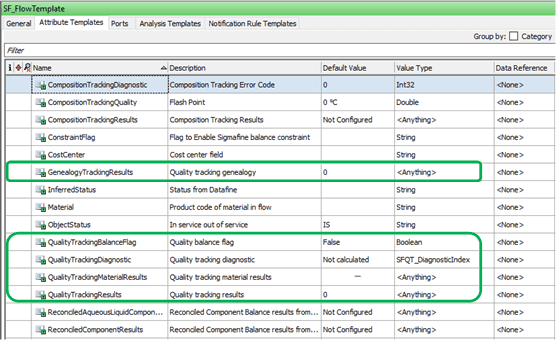
Note: Flows may have analyzer attached.
Tanks
For tanks, the following highlighted Attributes need to be configured:
- Quality Tracking Balance Flag [Input]: This Attribute is a flag that states if quality tracking needs to be propagated through the current object.
- Mixing Model [Input]: This Attribute is a mode of mixing the packets that are entering and exiting the tank (Well Mixed, Make-up purge, FIFO, LIFO). According to the specified mixing model, the algorithm will calculate different results because the number and interaction of the packets will be different. For more information about the mixing mode, please refer to the Composition Tracking section of the Sigmafine User Manual.
- Genealogy Tracking Result [Output]: This Attribute is a data table providing the information about the packets’ incoming source and relative quantity and fraction. This Attribute will be filled in the initialization process.
- Quality Tracking Result [Output]: This Attribute is a data table providing the calculated qualities for each packet according to the specified unit of measure. This Attribute will be filled in the initialization process.
- Quality Tracking Material Result [Output]: This is an optional Attribute that records a data table providing the calculated qualities for each packet and for each material according to the specified unit of measure. This Attribute can be optionally initialized in the initialization phase. If it is not initialized, then the analysis will use a default table.
- Quality Diagnostic [Output]: This is an optional Attribute where the analysis records the diagnostic error code.
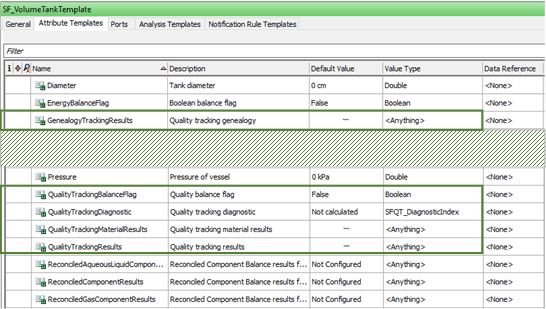
Note: Tank may have analyzer attached.
Node
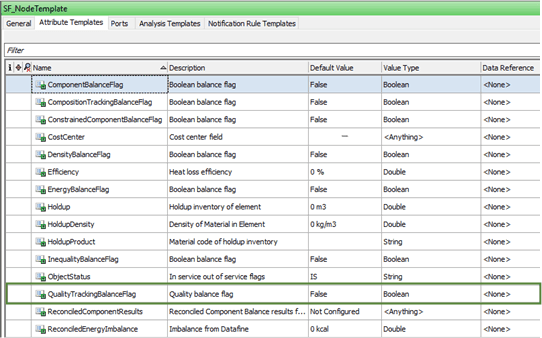
Nodes act as mixing points without inventory. The following Attribute needs to be configured:
- Quality Tracking Balance Flag [Input]: This Attribute is a flag that states if quality tracking needs to be propagated through the current object.
Receipt Point
The following Attribute needs to be configured:
- Quality Tracking Balance Flag [Input]: This Attribute is a flag that states if quality tracking needs to be propagated through the current object.
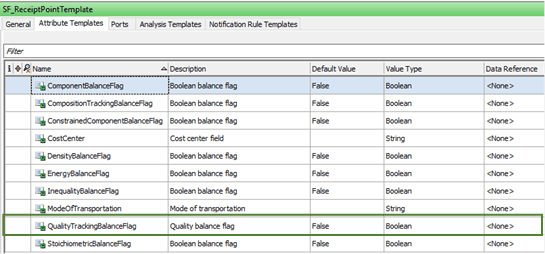
Note: Receipt Points may have analyzer attached. The SF_ReceiptPointTemplate doesn’t have an Analyzer Port configured by default. So, to connect an analyzer to a receipt point, it is necessary to add an Analyzer port to the SF_ReceiptPointTemplate. If the Case receipt point is connected to a Sigmafine flow, it is more suitable to connect the analyzer to the flow itself.
Shipment Point
Shipment Points don’t play any role in the quality tracking because they are end-points.
Process Units and Reactors
Process units and Reactors are currently not supported by Quality Tracking; they are considered black boxes in which materials are transformed and not simply mixed. To propagate the analysis after a process unit, analyzers should be placed on each of the output stream of the process unit or of the reactor to enable the calculation of the material qualities downstream.