Control Parameters
The Control Parameters tab in the Quality Tracking Configuration window provides general configuration options.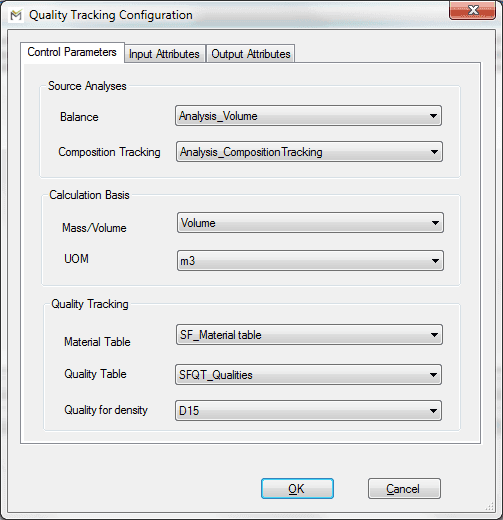
The following table provides the description of each option in the window.
Control Parameters Tab - Source Analysis Options
| Input Box | Description |
|---|---|
| Balance | Allows you to select a preconfigured Sigmafine Balance analysis from which reconciled mass/volume data are retrieved. |
| Composition Tracking | The Analysis Rule that allows you to select a preconfigured Composition Tracking analysis from which compositions and materials by packets are retrieved. With this choice, Quality tracking will inherit all of the configuration from the Composition Tracking analysis to set-up and run the internal composition tracking that generates the genealogy information. |
Control Parameters Tab - Calculation Basis Options
| Input Box | Description |
|---|---|
| Mass/Volume | Defines the calculation basis of the analysis in Mass or Volume. Based on this choice, all the calculated quantities and fraction will therefore be in mass or volume. |
| UOM | Allows you to define the unit of measure used to perform calculations. It automatically switches between the Mass or Volume UOM class according to the choice of calculation basis. |
Control Parameters Tab - Quality Tracking Options
| Input Box | Description |
|---|---|
| Material Table | Allows you to select the name of the material table from which the default value for each quality is retrieved. |
| Quality Table | Allows you to select the name of the quality table from which to retrieve the list of available qualities with the mixing rule parameters and its calculation basis (mass or volume). |
| Quality for density | Allows you to select the name of the density quality which is mandatory for each material. |