How Display Settings Work
Every time a display is opened, that does not have a specific configuration, SFHub Visualizer automatically selects a setting according to the following rules:
If the user assigned a Display Setting to the display, then the user's setting is selected.
If the administrator assigned a Display Setting to the display, then the global setting is selected.
If no setting is assigned and:
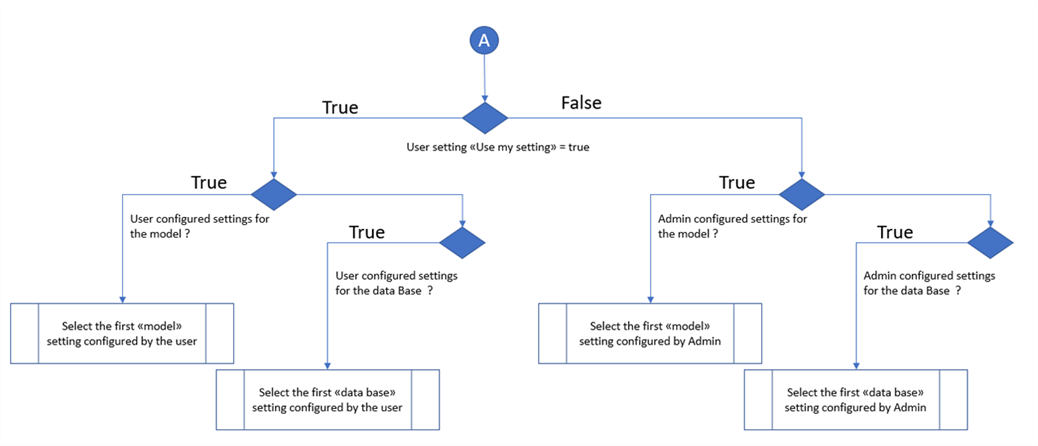
- If a Display Setting is configured by a user for the Database and Model, then the user's Display Setting is selected.
- If a Display Setting is configured by the administrator for the Database and Model, then the global Display Setting is selected.
However, if the user disables their "Use my display settings" option, the logic is reverted, giving priority to the Administrator's default Display Settings.
NoteWhen a display is opened, the "analysis" is not taken into consideration. Instead, the selection algorithm only checks for Server/Database and model settings.
If no Display Setting is assigned to a display, then SFHub Visualizer looks for a potential "analysis Display Setting" every time a case is selected.
The following flow chart depicts the rules SFHub Visualizer follows when determining what Display Settings to use for a person who has logged into the application.
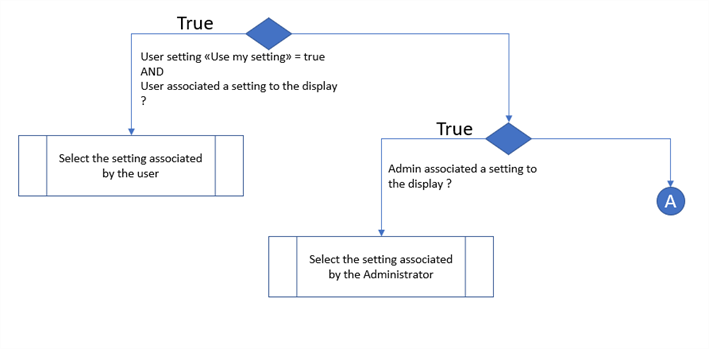
The next (following) flow chart depicts the rules SFHub Visualizer follows when a user opens a Display in the application.