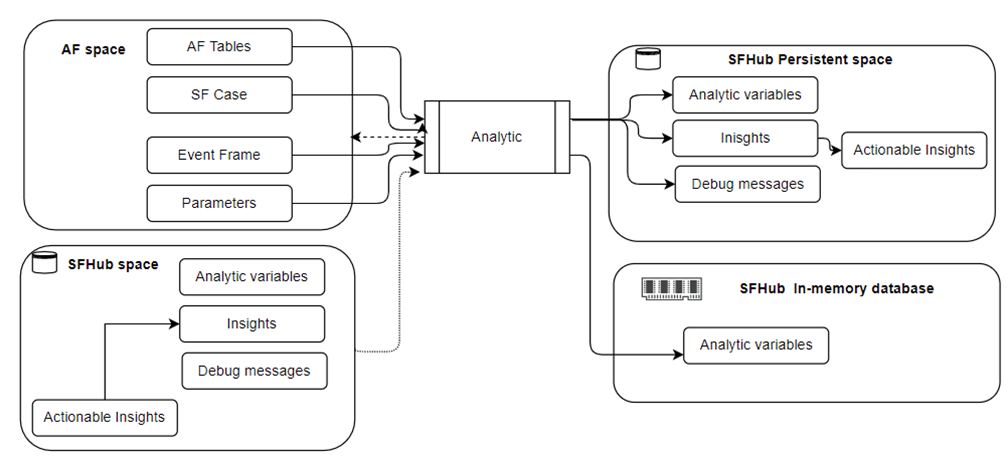
Analytic Working Spaces
Analytics are executed as independent threads within the SFHub Studio environment. SFHub Studio can run several analytics in parallel, though the number of analytics that can be run in parallel essentially depends on the hardware resources available. Whenever an analytic is run, SFHub Studio both synchronizes the execution according to the desired Mutex mode and prepares the input data set. It also manages the data set that is eventually produced by the analytic, otherwise known as the output dataset.
Analytic working space
Analytic working spaces
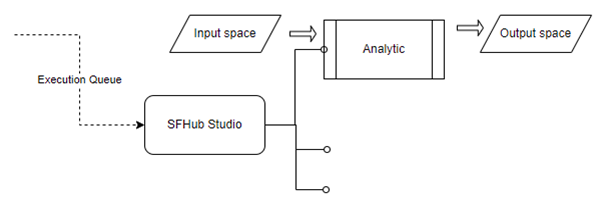
At the end of the analytic execution, SFHub Studio manages what has been produced and makes it available to the entire SFHub environment.
Input Working Space
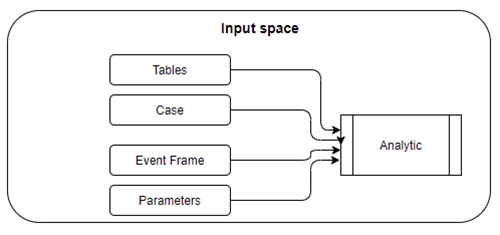
When an analytic is activated, SFHub Studio takes care of preparing the input space which consists of:
Connection to the AF PI System and database, performed by impersonating the user
The AF Case associated with the analytic
Access to database resources
Parameters, by default the analytics receives the selected element (if any) and eventually the Interface variables
Input working space
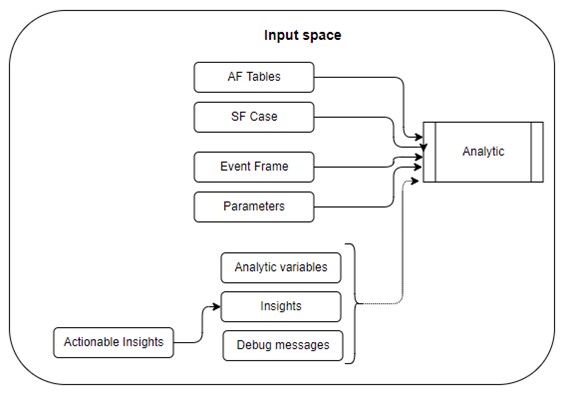
Based on the logic implemented in the analytic, the Input Space can also extend to the information produced by other analytics. This happens whenever the analytic runs, synchronously or asynchronously, other analytics.
Input space when run with other analytics
Output Working Space
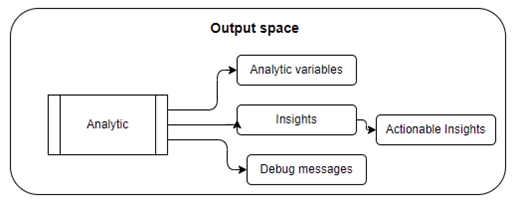
Output is a bit more flexible in that it can produce no output or any of the following entities as output:
Analytic variables - The number and data type of the variables produced is defined by the logic of the analytic.
NoteOnly the Analytic variables are made available, the variables associated with the elements are not persistent
It is good practice to limit the number of variables produced and their size (dimension)
Insights - The number and content of the insights is defined by the logic
Debug messages - Remember that debug messages are generated only when the analytic is run in interactive mode. Debug messages shall be used for debugging the logic, in all other cases report messages shall be produced
Actionable insights (digital actions) - Actionable insights are always associated with an insight message, an insight message can have multiple actionable insights.
Output working space
SFHub Studio archives the output space according to the execution mode:
Persistent - The data produced by the analytic is persistent in the SFHub environment and therefore usable by any other subsystem. In this modality the output space is stored permanently in the SFHub space (SQL database).
In memory - The data produced by the analytic is volatile and temporarily stored in an "in memory" database for fast consumption.
Persistent
The output produced by each analytic (output working space) is stored persistently in the SFHub space (SQL database) through a unique key that allows access to the correct image according to the selected case and the user who logs in.
Persistent Output working space
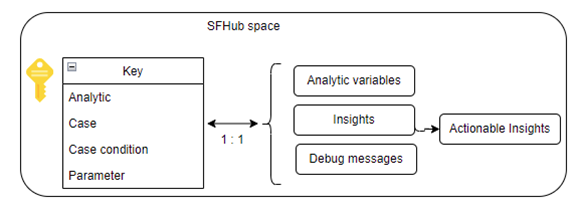
The key not only contains the identifiers of the analytic and of the case, but also the state of the case at the time of execution (checked out or not) and the execution parameters.
At any time, therefore, more output spaces can exist for the same pair of analytic and case. The analytic output space is persistent in the SFHub environment until one of the following conditions occurs:
The analytic is modified (the output space is removed)
The case changes state; for example a checked out case is confirmed (only one output space is made available to all users)
The analytic is deleted (all stored instances are removed)
In Memory Database
The analytic output data set (output space) is temporarily stored in the In Memory database. All services that have requested the execution of the analytic have access to the content. The dataset is automatically removed as soon as all consumers (requesting services) have collected the data.
Working Space Summary
In summary, the Analytic working space consists of:
The AF Server context
The SFHub persistent data base
The SFHub in memory data base
Analytic Working Space summary