Upgrade Sigmafine 4.4 to Sigmafine 4.7 R2
Sigmafine 4.4 runs on top of the AF 1.3 infrastructure, whereas Sigmafine 4.7 R2 runs on top of the AF 2.10 infrastructure. Meaning, a major change on the underlying OSIsoft technology has occurred.
Upgrading Sigmafine from 4.4 version to 4.7 R2 version can be supported by a migration project that has the objectives to correctly address the following aspects:
- Assessment of the hardware and software requirements
- An upgrade of the PI AF infrastructure (PI AF Services 2018 SP3, PI AF Client 2018 SP3, PI ProcessBook)
- The latest Sigmafine Base Software version installation
- The latest Sigmafine Software add-ons if required (e.g. SF-ADA, SQL Access, Integration Framework, WSA)
- Migration of the Sigmafine Assets configurations from AF 1.3 to AF 2.10
- Migration of the Sigmafine Analysis Configurations
- Migration of the Sigmafine Analysis Case data (limited to a reasonable number of Cases)
- Validation and testing of the new installation
Note: In order to upgrade Sigmafine 4.4 to Sigmafine 4.7 R2, please contact Sigmafine Tech Support.
Sigmafine Excel Add-In Conversion
If there are reports in Excel that use the old version of the Sigmafine Excel Add-in, the following step needs to be done in order to convert the formulas to the new Sigmafine Excel Add-In format.
On the Sigmafine client machine:
- Open Excel.
- Load the report that needs to be converted.
- Once loaded, click on a cell.
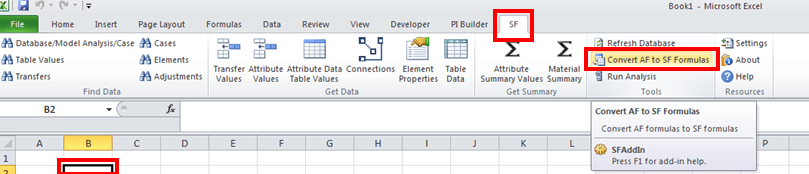
- In the SF menu, select Convert AF to SF Formulas.
- Click Convert to perform the conversion.