Create the SigmafineRestServices Website
To create the SigmafineRestServices Website:
Run the Windows IIS Manager.
Select Sites > Add Website, as shown in the following figure.
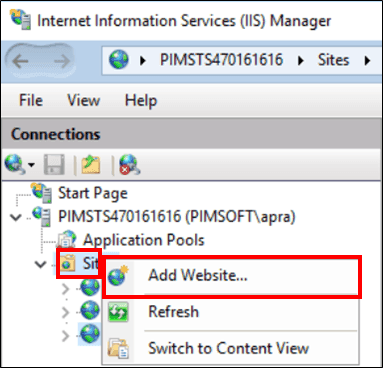
The Add Website window opens.
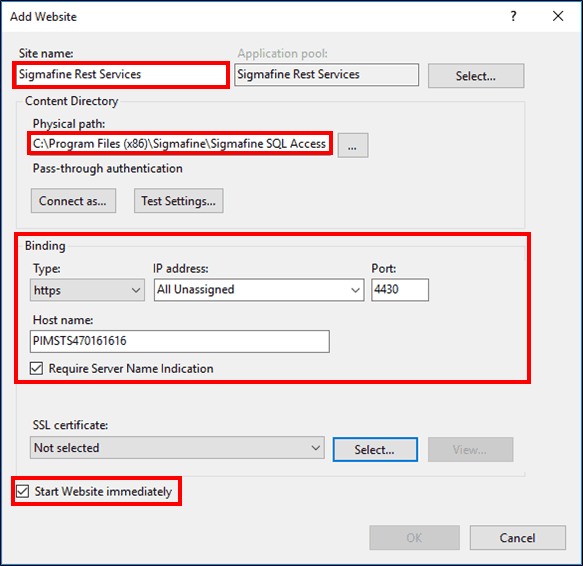
Fill in the Sigmafine RESTful Services Web Site configuration information, using Figure 1225 as an example.
In the Site name box, type in a name indicative of the Sigmafine RESTful Services (e.g. Sigmafine Rest Services).
In the Physical path box, type the path and directory (folder) to the Sigmafine SQL Access installation.
Alternatively, you can click the
 ellipsis button to locate and select it from a standard Windows file search window.
Under the 'Binding' area, configure the following:
Click the Type box down-arrow and select https.
Click on the IP address down-arrow and select All Unassigned.
In the Port box, type the number of a free https port (the default is 4430).
In the Host name box, type the name of the server where IIS is hosted.
Check the Required Server Name Indication checkbox.
Check the Start Website immediately checkbox.
Click OK to save the configuration.
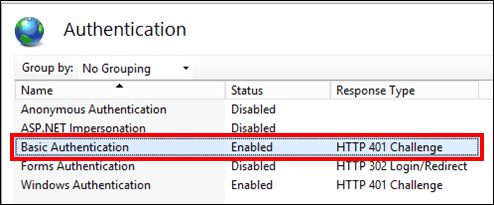
Assign the Basic Authentication settings to the new Web Site as shown in the following figure.