Configure Windows Server Roles
The first step in the process of configuring the Sigmafine RESTful Services is to configure and verify the following Windows Server Roles.
Note: You must have Administrative privileges on the server in order to perform the following steps.
To ensure that the server roles are installed and configured:
- Open Windows Web Server (IIS).
- Go to Management Tools > IIS Management Console.
- Under Roles, ensure that the boxes shown in the following figure are checked for Web Server (IIS).
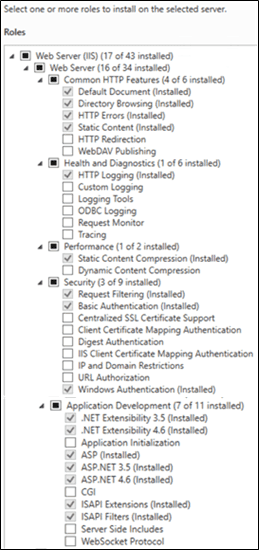
- If you had made any changes, be sure to save them.
The next step in setting up the Sigmafine SQL Access Server is Configure Windows Server Features.