Other Primary Menu Options
The other primary menus (Publisher, Configurator and Admin) contain options that are available to you, based on your permissions and the menu you select. The options are divided into five categories, however, not all categories are available on all menus. The five categories are as follows:
- Server/Database
- Model/Analysis
- Filter
- Publishing Service Status
- Actions Quick View
 EXAMPLE: Five sections displays in the Publisher pane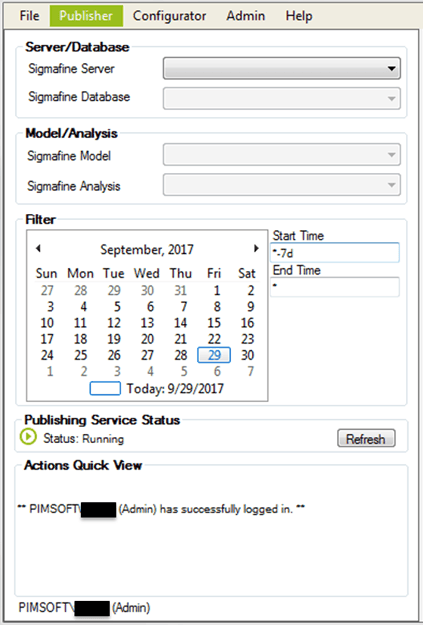
The five sections are explained in the following.
Server/Database, Model/Analysis and Filter
The Server/Database, Model/Analysis and Filter categories are used to set up SQL Access features in the Publisher, Configurator, and Admin panels. The options contained in these categories provide lists of available items that are dictated by the service the application connects to, the servers/databases that have been registered for SQL Access by an Admin, and your level of access based on your log-in credentials.
Publishing Service Status
The Publishing Service Status category is available to all user types and displays the status of the Publishing Service that the application has connected with. All users can refresh the status category to obtain the latest condition of the service.
The three most common statuses are:
| Status Icon | Status | Description |
|---|---|---|
| Running | The 'running' icon indicates that the Publishing Service is currently in a "running" state. | |
| Paused orPending | The 'paused/pending' icon indicates that the Publishing Service is currently in a "paused" or "pending" state. | |
| Stopped | The 'stopped' icon indicates that the Publishing Service is currently in a "stopped" state. |
Actions Quick View
The Actions Quick View category provides real-time feedback to actions and requests made while logged in. Warning and error messages are reported on the Actions Quick View in red, and all publishing, configuring, and registration requests are reported in black.
Note: The Publishing Service Status may display as ‘Unavailable’ when the domain account, under which the Web Server is running, does not have sufficient privileges to allow for service control.