View Publishing Status Tab
The View Publishing Status tab allows you to view the publishing status of tables or cases. In addition, it also provides advanced search capabilities that allow you to customize your search request criteria as opposed to using the selectable options found under 'Publisher' on the primary menu.
The View Publishing Status tab’s toolbar includes:
View Publishing Status Toolbar Controls
| Control Icon | Control Name | Control Description |
|---|---|---|
| Advanced Search | Opens an "Advanced Search" window that provides additional options you can use as filters to locate a specific table or case. | |
| Refresh Status | Refreshes the search results using either the Publishers pane or the "Advanced Search" window's options. |
Viewing Publishing Status
To view the publishing status for tables or cases:
- Select Publisher from the primary menu.
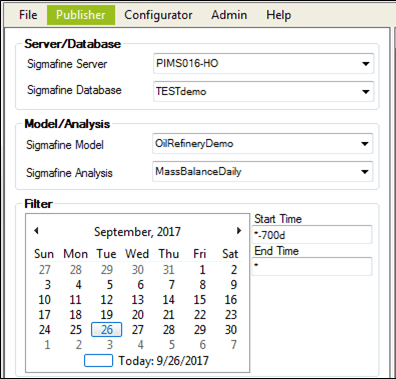
- Click on the Sigmafine Server down-arrow and select the server containing the database that holds the tables.
- Click on the Sigmafine Database down-arrow and select the database that contains the tables to be published.
- If you want view the publishing status for tables, go directly to step 6 (skipping steps 4 and 5).
- If you want the publishing status for cases, perform steps 4 and 5 prior to step 6.
Click on the Sigmafine Model down-arrow and select the Model that contains the analysis.
Click on the Sigmafine Analysis down-arrow and select the analysis that contains the cases.
Click on the View Publishing Status tab.
If you selected only a 'Server' and 'Database', the publishing status list pane displays all of the tables based on those two selections.
If you select a ' Server', 'Database', 'Model' and 'Analysis', the publishing status list pane displays all of the Cases based on those four selections.
Note: If you would prefer to customize the search request criteria used to search for publishing statuses you want to view, see Customizing Publishing Status & Logs Search Requests.