Publish Cases Tab
The Publish Cases tab allows you to enable or disable the publishing of Cases to a SQL Server,
The Publish Cases tab’s toolbar includes:
Publish Cases Toolbar Controls
| Control Icon | Control Name | Control Description |
|---|---|---|
| Publish | Publishes all of the Cases that the user has selected using the checkboxes associated with each Case in the list. The list of Cases is automatically generated when you select a Sigmafine Database, Model and Analysis. | |
| Select All | Checks all of the checkboxes in the list of cases. Click this button if you want to all the Cases to be published with a single publish request. | |
| Deselect All | Removes all of the checkboxes in the list of cases. | |
| Refresh | Refreshes the list of cases. When this button is clicked, all of the checked boxes are cleared and any Case changes are loaded to the list. |
Enable/Disable the Publishing Tables Feature
To publish tables to a SQL Server:
Select Publisher from the primary menu.
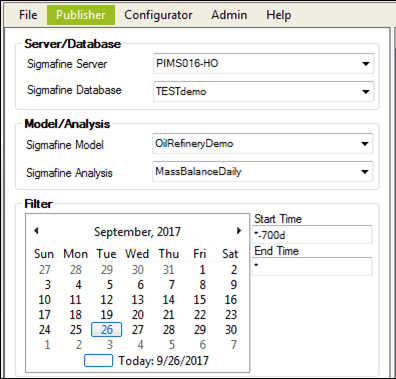
Click on the Sigmafine Server down-arrow and select the server containing the database that holds the tables.
Click on the Sigmafine Database down-arrow and select the database that contains the tables to be published.
Click on the Sigmafine Model down-arrow and select the Model that contains the cases.
Click on the Sigmafine Analysis down-arrow and select the analysis that contains the actual cases.
Click on the Publish Cases tab if it is not already selected.
The Publish Cases list displays the list of Cases based on the Server, Database, Model and Analysis you have selected.
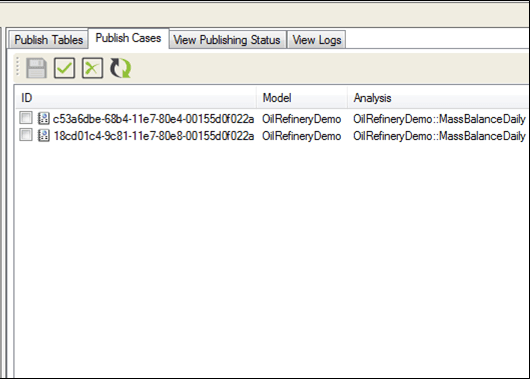
Do one of the following for each case, depending on whether you want to enable or disable the publish feature:
- Check the checkbox next to each Case for which you want to enable publishing.
- Uncheck the checkbox next to each Case for which you want to disable publishing.
- Click the Save icon to save the configuration changes.