Editing AF Data Set Properties
ProcessBook can build trend traces, values, or bars from data retrieved from data sets just as it does from specific points in the PI Data Archive. The AF Modeler Add-In provides a Data Set for accessing AF data. The following steps describe how to configure the AF Data Set.
To configure or edit the AF Data Set:
Select Tools > Data Set, as shown in the following figure.
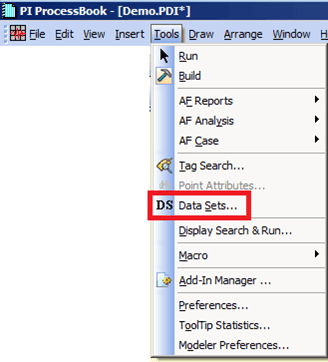
The Data Set window opens.

In the Data Sets list, select AF.
Click the Edit button.
The AF Dataset Configuration window opens.

Click on the Refresh Interval up or down arrow to select a rate at which the AF Data Set checks for new values in AF.
Check the checkboxes under Data Retrieval Options for those options you want to select. Make your selections on whether data references should execute all the time.
Note: For very large Model displays, you may prefer to limit when data references execute.
- Check the Do not retrieve AF Data in Build Mode checkbox if you do no want the data references to execute during 'Build' mode.
- Check the In the context of an AFCase, only retrieve AF Attribute Data References Values that are in the Result Setcheckbox if you only want to retrieve the Result Set data reference values.
- Check the Enable Fully Load Case check box if you want to load the complete Case data in order to improve the display annotations refresh. For very large Model displays, you may prefer to disable this option to avoid the risk of ‘Out of Memory’ exception due to the working set restrictions of 32 bit applications.
- Click OK to save your configuration changes and close the AF Dataset Configuration window.