Summary Function
The Summary function allows you to perform a summary over a specified value, but unlike the standard PI Point DR, the summary can be filtered by another tag (control tag) that indicates when to perform the totalization and when not to (through a condition setup by the user).
In this case, the summary interval is started when the event expression (or condition) result is matching. The totalization will continue until the expression of the condition is evaluated to give a False value (condition does not match). At which point the summary is suspended until a new positive condition of the second tag is matching. The times at which the condition expression is evaluated can be different from the points stored in the main rate tag.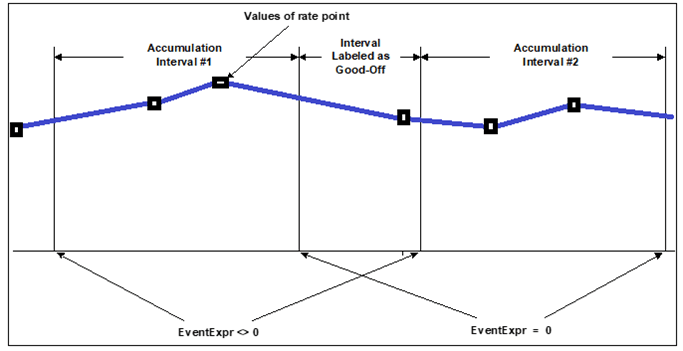
Please note that the Pct Good is not used for the summary of the rate tag within the slices defined by the control/condition tag. In the schema below, you can see a sample schema with 2 tags:
- SINUSOID: It is the rate tag to be totalized (BLACK).
- INUSOIDU: It is the filtering tag where to apply the condition. In this case, the totalization of the tag SINUSOID only considers the area when the SINUSOIDU is greater than 0.

See Configuring - Summary Function for details on how to configure this function.