Quality Table
The quality table is formatted as shown below: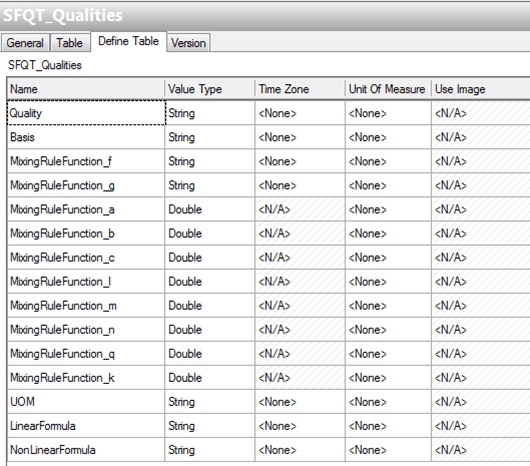
This table defines the list of qualities and their associated mixing rule parameters, unit-of-measurements and formulas. Based on these parameters, the quality tracking analysis will perform the calculations.
Quality: It is the quality name that must be the same as the one specified in the Material Table and in the analyzer QualityType attribute.
Basis: The associated value can be “MASS” or “VOLUME” according to the mixing rule for that quality (e.g. the Flash point is mixed on a volume basis whilst Viscosity is mixed on a mass basis).
MixingRuleFunction: Define the mixing rule coefficients to be used according to the formula:

To disable functions f and g, put the keyword NONE.
For a linear mixing use the following set of values:
Parameter Value f NONE g NONE a 1 b 0 c 1 l 1 m 0 n 1 q 1 k 0 UOM: It is the unit of measure associated to the quality.
Note: For a consistent calculation, all the measured qualities should be made consistent with the UOM class specified in the quality table. Also, the default quality values that are set in the Material table refer to this UOM class. For example; if the quality UOM is °C, you can configure in Material table °F or K or °R.
LinearFormula / NonLinearFormula: In Case of very complex mixing rules that cannot be directly set up using the coefficients, the user can type the linearization formula and the inverse formula directly into this field. Use the keyword {0} in place of the quality argument.
 EXAMPLE: Quality Cloud (CLD) Point
For quality CLD (cloud point), Quality Tracking analysis rule will parse the formulas that are defined for CLD quality.