Create Sub-Model References on the Overall Model
The Sigmafine Modeler performs actions on the sub-Models according to sub-Model references that are defined in the overall model.
To create sub-Model references:
Select the overall Model where the references are to be created.
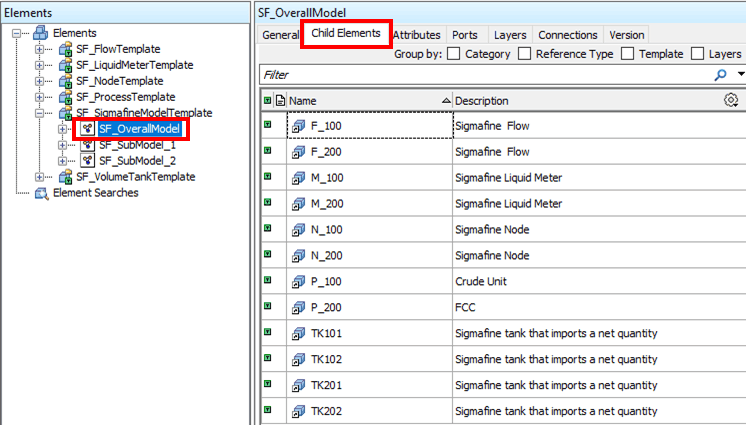
Click on the Child Element tab, as shown in Figure 930.
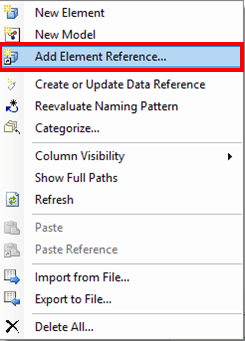
Select the Add Element Reference option, as shown in the following figure.
The Add Element(s) window opens.
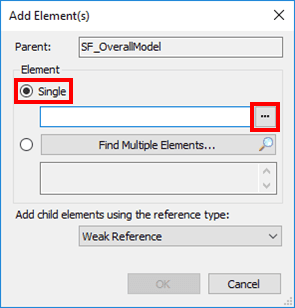
Use one of the following methods to select a sub-Model to add as an Element Reference:
To add a single sub-Model as an Element reference:
Under Element, select the Single option.
Click on the
 ellipsis button to open the Element Browser window.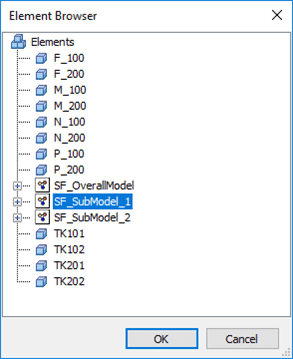
Select the sub-Model you want.
To add multiple sub-Models as Element references:
Under Element, select the Single option.
Click on the
ellipsis button to open the Element Browser window.Select the sub-Models you want.
Use the standard Windows Ctrl + \<click> or Shift + \<click> methods to select the multiple sub-models.
Click OK to save your selection(s) and close the Element Browser window.
You are returned to the Add Element(s) window, in which the element (or elements) selected appears in the window.
Click OK In the Add Element(s) window to save your selection and close the window.