Load/Unload ADA in ProcessBook
The following instructions provide the steps for loading and unloading the Advanced Diagnostic Add-In (ADA) in ProcessBook.
- Open ProcessBook.
- Go to Tools > Add-In Manager to open the Add-In Manager window, as shown in the following figure.
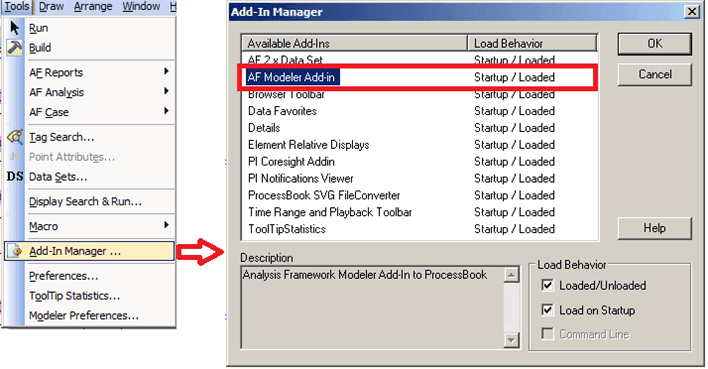
- From the Available Add-Ins list, select AF Modeler Add-in.
- Follow the step below that coincides with what you want to do:
- To load the Modeler: Ensure that the Loaded/Unloaded checkbox is checked.If it isn't checked, click on it to check it. If you would like Modeler to load upon start-up, also check the Load on Startup checkbox.
- To unload the Modeler: Ensure that the Loaded/Unloaded checkbox is not checked. If it is, click on the checkbox to uncheck it.
- Click OK (or Cancel) to close the Add-In Manager window.