Sigmafine Infrastructure
The Sigmafine infrastructure includes server and client components. The Sigmafine server holds the entire configuration for Sigmafine, and the client components allow the user to execute the Analysis and evaluate the results.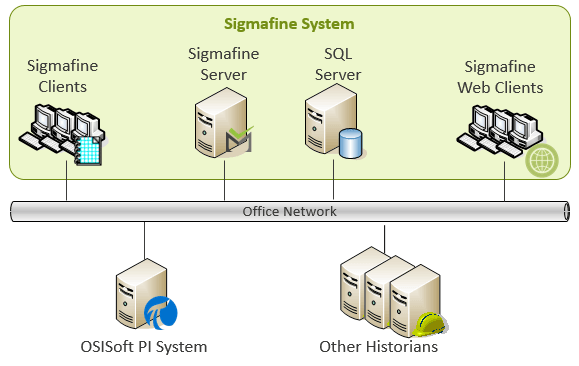
The following is a brief description of the different components of Sigmafine.
Note: Another network connects with PI Production Servers and Other historians (Plant Network). This network connects with the Office Network.
Sigmafine and SQL Server
Sigmafine Server is the main application server and serves client applications by managing configuration of process objects and their connections. It also manages configurations of the Sigmafine analysis for mass, volume, component, and energy balances. The Sigmafine Server requires a SQL Server for permanent storage of data and metadata (configurations).
There are two different scenarios for the installation of the Sigmafine Server components: SQL Server resides on a machine different from the Sigmafine server or SQL Server resides on the same machine. For production environments, Pimsoft strongly recommends a distributed configuration where the Sigmafine and SQL Servers reside on a different computers so that they do not compete for resources. The scenario with SQL Server and Sigmafine server residing on the same machine is suggested only for TEST/DEVELOPMENT environments.
- Sigmafine Server
- Asset Framework Server (AF Server)
- OEM PI Server dedicated for Sigmafine use
- PI System Management tool
- Pimsoft SQL Access Server component (client component may or may not be installed)
Sigmafine Clients
Used to configure the models, execute balances, import and export data, and perform the subsequent analysis of the reconciliation results.
Sigmafine Client is usually installed on dedicated client machines. However, it is recommended to also have the Sigmafine Client installed directly on the Sigmafine Server for troubleshooting purposes.
- Pimsoft Sigmafine Modeler Add-In for OSISoft Process Book - Graphical interface
- Pimsoft Sigmafine Add-In for Microsoft Excel - a standard Microsoft Excel Add-In that may be used to configure Sigmafine reports
- Pimsoft Sigmafine Advanced Diagnostics Add-In - The Sigmafine Advanced Diagnostics Add-In integrates with ProcessBook using dockable window to display Sigmafine plant data and is used to analyze the Sigmafine data pre and post reconciliation results.
- Pimsoft SQL Access Sigmafine SQL Access client provides a means of publishing Sigmafine Case data to a PI Server or to a SQL Server.
- OSISoft AF Builder is a Microsoft Excel Add-In that is used for bulk loading and configuration of Sigmafine AF Model elements.
OSIsoft PI System
Represents PI Servers in the production environment that interface with plants system (DCS, SCADA… etc.) and other manufacturing systems (i.e. LIMS, PIMS).
Other Historians
Represents non-PI historians i.e. IP21, PHD. Typically, such historians are connected either through a component embedded in the Sigmafine server called OSISoft COM Connectors or via PI Interfaces.
Com Connectors
COM Connectors are transparent components that allow Sigmafine reading/writing data against non-PI Historians. COM Connectors run within the embedded or OEM PI Server installed on the Sigmafine server. This embedded instance isolates Sigmafine from any changes or updates made to any production PI Server. When another historian is used as the source of the data, the embedded PI Server serves as a gateway to the other historian using OSISoft COM Connectors.
Note: PI COM Connectors are no longer supported by PI Data Archive 2018 SP3 Patch 1 (3.4.435.604) due to new security requirements. Upgrading PI to this version has significant ramifications to those installations that employ COM Connectors. Issues to be considered are detailed under Upgrade PI Data Archive to 2018 SP3 Patch1.