Tank Monitoring Input Attributes
Tank Monitoring Tank Input Attributes are configured in the Tank Monitoring Configuration window under the Tank Input Attributes tab, as shown in the following figure. These attributes must be configured as input for the Tank Monitoring Analysis Rule.
Note: The Plug-in Configuration tab is disabled, if a license file is not installed, or it the license has expired.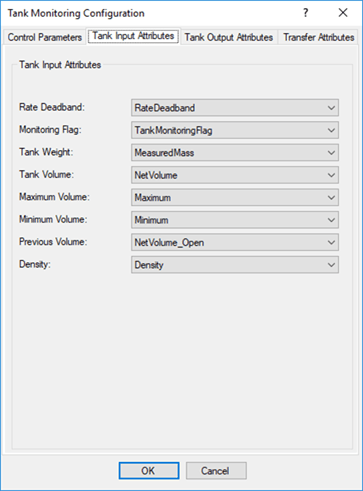
The following table provides descriptions of the tank input attributes for the Tank Monitoring Analysis Rule.
Analysis Configuration - Required Input Attributes
| Attribute Name | Description |
|---|---|
| Rate Dead Bank | A tank attribute that contains the Dead Band of rate. |
| Monitoring Flag | A tank attribute that enables tank monitoring. |
| Tank Weight | A tank attribute with the Net Weight of Material in the Tank. |
| Tank Volume | A tank attribute with the Net Volume of Material in the Tank. |
| Maximum Volume | A tank attribute with the Maximum tank capacity. |
| Minimum Volume | A tank attribute with the Minimum tank capacity. |
| Previous Volume | A tank attribute with the Net Volume of Material in the Tank at the Start Time of the analysis. |
| Density | A tank attribute containing the density value. |
The following table provides the properties of the input attributes that must be configured for the Tank Monitoring Analysis Rule.
Analysis Configuration - Required Input Attributes Properties
| Attribute Name | Unit Class | Default Name | Parameter Value Type |
|---|---|---|---|
| Rate Dead Band | Volume Flow Rate Limit for alarm condition | RateDeadband | Double |
| Monitoring Flag | Dimensionless | TankMonitoringFlag | Boolean |
| Tank Weight | Mass | NetWeight | Double |
| Tank Volume | Volume | NetVolume | Double |
| Maximum Volume | Volume | Maximum | Double |
| Minimum Volume | Volume | Minimum | Double |
| Previous Volume | Volume | NetVolume_OPEN | Double |
| Density | Density | Density | Double |