Configure Tank Monitoring Analysis Rule
The Tank Monitoring Analysis Rule requires a set of control parameters. The control parameters consist of generic information that must be set to allow the application to run with the proper parameters.
The required control parameters can be configured in the Tank monitoring Configuration window under the Control Parameter tab, as shown in the following figure.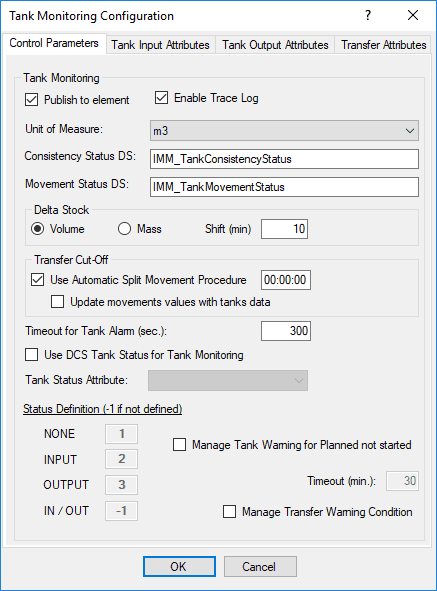
The table below lists the control parameters that must be set for the Tank Monitoring Analysis Rule.
Tank Monitoring Analysis Rule - Control Parameters
| Parameters | Description |
|---|---|
| Publish to element | If selected, the attribute value is stored not only at case level, but also at database level, so that they are readable without entering into the case. |
| Trace Log File | If selected, specific log messages for tank monitoring are added to the standard AF trace. |
| Event Table | Th AF table used to store the event messages (LOG). |
| Unit of Measure | The Tank Volume Unit of Measure (UOM). |
| Consistency Status Digital set | The digital set used for “Tank consistency status”. |
| Movement Status digital set | The digital set used for “Tank movement status”. |
| Delta Stock Shift | The time expressed in minutes (default 10). It is the time range to calculate the Delta Stock used in the Tank monitoring. |
| Volume / Mass Option | The default is 'Volume Option': in this case delta stock is calculated using Volume. If Mass is selected, the Volume is calculated starting from Mass (and density must be available). |
| Use Automatic Split and text box | If selected, an offset is set to split the daily transfer; the transfers that are active are automatically closed and re-opened at this time, with the same attribute values, except the measured mass quantity which is set to 0. |
| Timeout for alarm (sec) | The period after which the alarm status is confirmed. |
| Use DCS Tank Status for Tank Monitoring and TankStatusAttribute and Status Definition | A parameter that is set if the alarm status is managed by the DCS with a tag that assumes integer values. If this is the situation, the TankStatusAttribute contains the digital set state in PI and the ordered status translates the values None, Input, Output, and In/Out. |
| ManageTank Warning for planned not started and text box | If selected, the tank assumes the status NOT_STARTED, if a planned transfer has not been started yet after the defined timeout period. |