SFHub Dashboard
Your SFHub dashboard displays after you have successfully logged into Sigmafine Hub. Your dashboard page provides an overview of the most recent accessed SFHub entities, as well as the entities shared with you, and includes a calendar that provides you with a preview of any tasks you have scheduled.
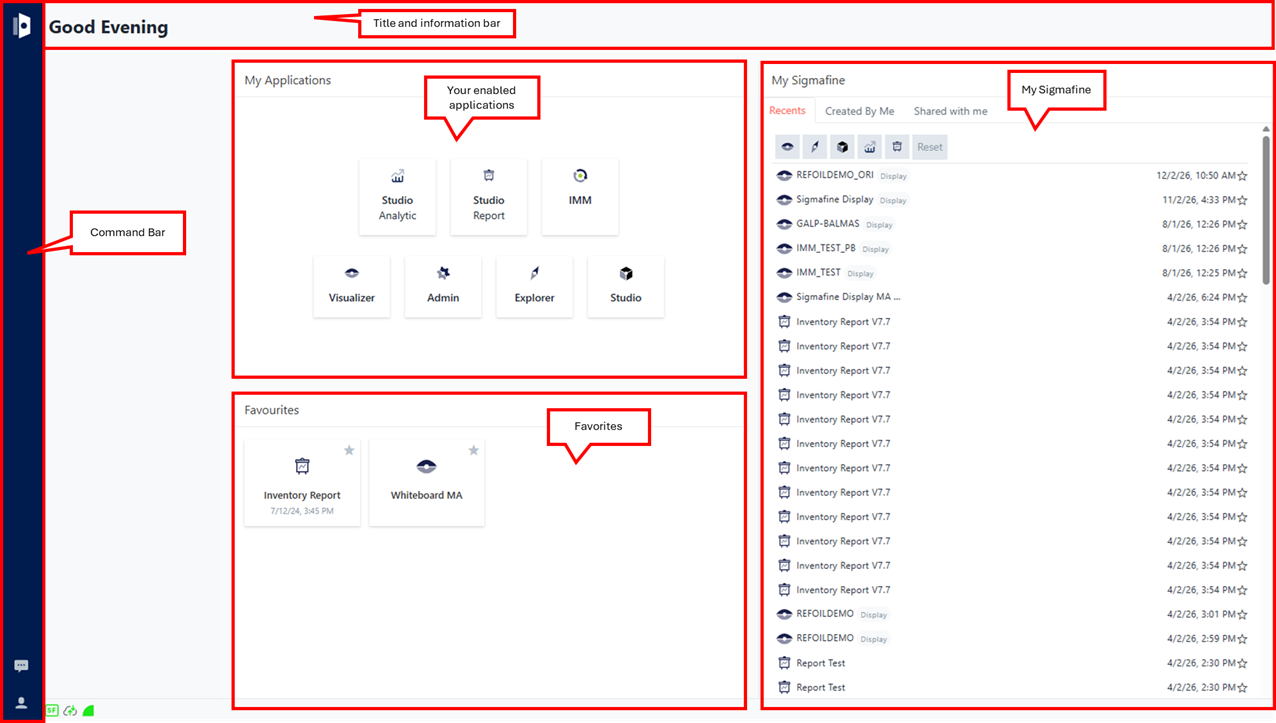
Your dashboard is divided into the five areas; Title & Information, My Applications, Favorites, My Sigmafine and the command bar. The following table explains each of the areas of your dashboard.
Dashboard Areas
Title & Information
This area displays the Welcome message. In future releases, it may also contain other information.
My Applications
This area provides quick access to the SFHub Applications for which you have access. Applications can consist of:
- SFHub Visualizer
- SFHub Admin
- SFHub Studio
- SFHub IMM
Applications are displayed according to the SFHub license and permissions you have been granted by the SigmafineHub Administrator.
Favorites
This area provides quick access to your personal favorites. Favorites can consist of:
- SFHub Visualizer - Displays
- SFHub Studio - Projects
- SFHub Studio - Analytics
- SFHub Studio - Reports
For more details about Favorites, see Favorites
My Sigmafine
This area is your main hub for accessing the most recent entities you have worked with, all entities you have created and all entities shared with you For more details about My Sigmafine, see My Sigmafine.
Command - bar
This area displays the command options available to you when viewing your Dashboard.
| Icon | Function | Description |
|---|---|---|
 | Messaging | The Messaging icon allows you to exchange text messages and attachments with other currently connected SFHub Visualizer users. |
 | User Actions | The User Actions icon opens a menu from which you can choose to view the About page or log out of SFHub.  |