View Application Licenses
SigmafineHub Admin users can use the License page to view the status of the SigmafineHub licenses, and to configure the connection of the SigmafineHub Application Server to a licensed Sigmafine Server.
Log into SigmafineHub Admin.
Click the
 License icon.
The License page opens.
License icon.
The License page opens.License page
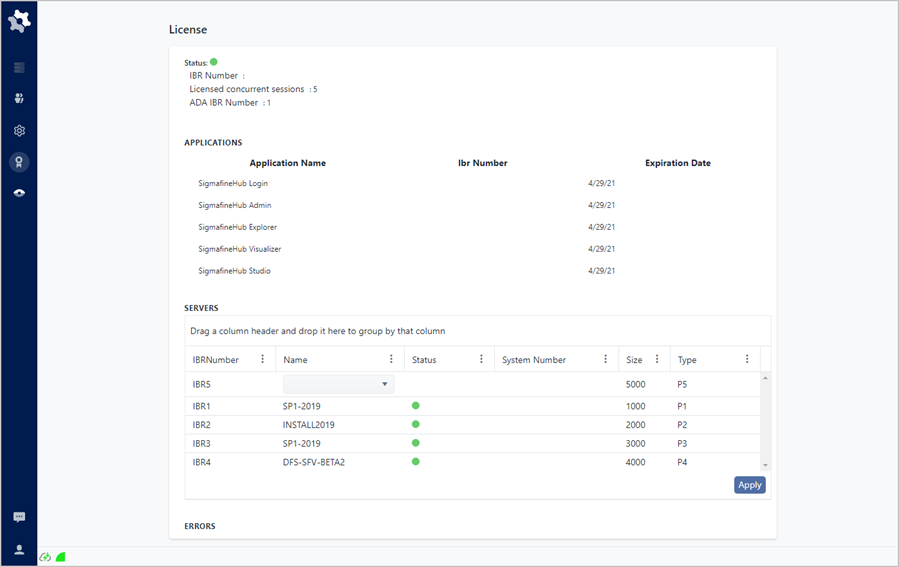
License Page Descriptions
Status
The Status area provides a general overview of the SigmafineHub license status.
- Green bullet - indicates that the SigmafineHub license is OK.
- Red bullet - indicates that there is an issue with the SigmafineHub license .
| IBR Number | The IBR number that is associated with the SigmafineHub License. |
| Licensed Concurrent Sessions | Indicates the maximum number of allowed concurrent sessions to the SigmafineHub Application Server. |
| ADA IBR Number | The ADA IBR Number that is associated with the Sigmafine Advanced Diagnostic license. |
Applications
The Applications area shows a list of the licensed SigmafineHub applications.
| Application Name | Shows the name of the licensed SigmafineHub application. |
| IBR Number | The IBR Number that is associated with the SigmafineHub licensed application. |
| Expiration Date | Shows the date on which the SigmafineHub application is to expire. |
Servers
The Servers area shows the list of licensed Sigmafine Servers that the SigmafineHub can connect to.
| Name | Shows the name of the Sigmafine Server configured for the SigmafineHub. |
| IBR Number | The IBR Number that is associated with the Sigmafine Server license. |
| Status | Shows the date on which the Sigmafine Server license is to expire. |
| System Number | The number of the system that is associated with the Sigmafine Server license. |
| Size | Indicates the number of elements associated with the Sigmafine Server license. |
| Type | Indicates the type of Sigmafine Server license: P - indicates a production server license D - indicates a development server license |
Errors
The Errors area shows any errors occurring with the Sigmafine Server(s) and the SigmafineHub Application Server.