Assign a Sigmafine Server to the SigmafineHub License
If your SigmafineHub has been installed and you have copied the Pimsoft license file to the machine's C:\ProgramData\Pimsoft folder, you now need to assign the Sigmafine Server to the SigmafineHub Application Server to which it will be connecting. This registration assignment is done through the License page in the SigmafineHub Admin application.
The license page shows a list of IBR number entries that correspond to the licensed Sigmafine Servers. The number of entries depend on your license agreement, and on the number of licensed Sigmafine Server (Production and / or development) you have.
To assign a Sigmafine Server to the SigmafineHub license:
The registering (assigning) of a Sigmafine Server is irreversible.
Log into SigmafineHub Admin.
Click the
 License icon.
The License page opens.
License page
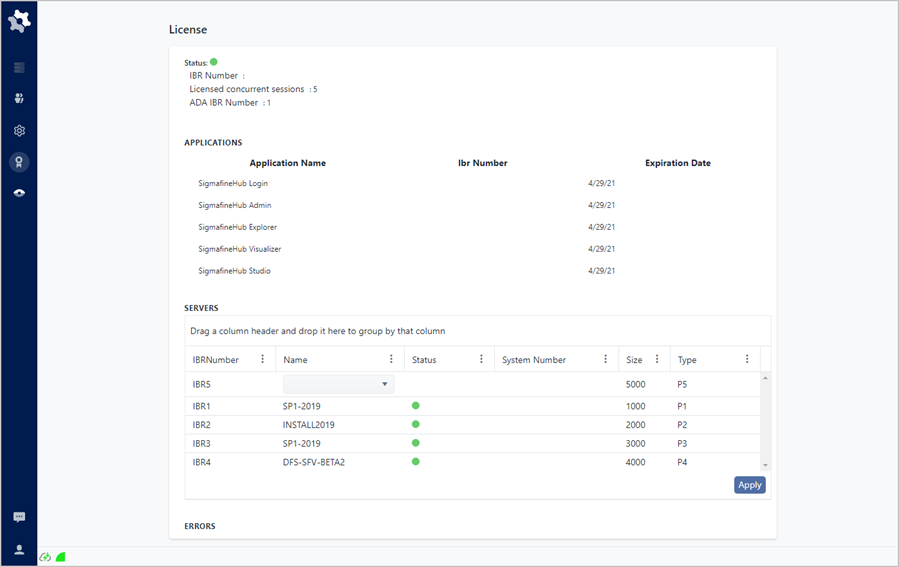
In the Servers area of the License page, you can assign a Sigmafine Server for each available IBR number. , you can assign a Sigmafine Server by selecting it from the drop-down list.
Under the Name column, click down-arrow to expand the list of available Sigmafine Servers.
License page - Servers area - assign server to IBR number
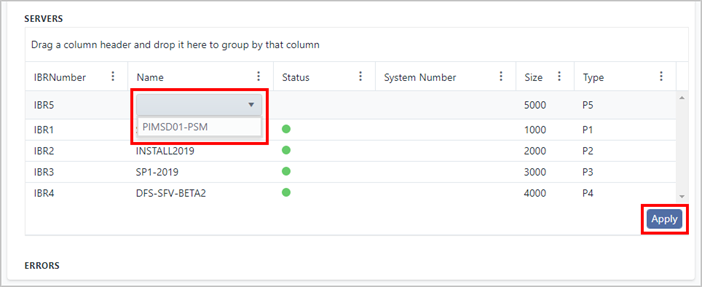
The list displays the Sigmafine Servers that are registered through the PI System Explorer (see SFV Requirements and Installation for more information).
Click on the server name that you want to assign to the IBR number.
Press Apply to confirm the assignment and save it in the SigmafineHub license data.