SFHub Syntax - Search
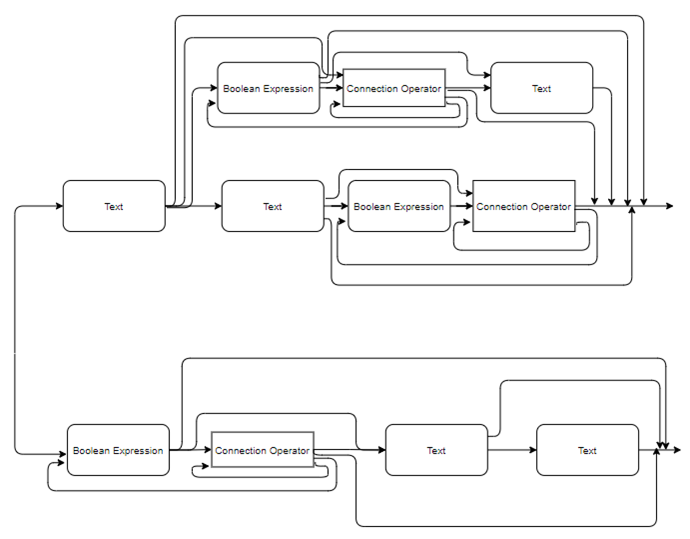
Search expressions can combine operators, special operator and connection operators, as well as Boolean expression and literals. Please note though that Search expressions cannot use variables.
Web applications make extensive use of the search engine. For example, SFHub Visualizer uses search in display search, transfer source and destination and calculation on the fly.
[Literal] [Literal] [Expression] [special operator] [connection operator]
| Expression | Description |
|---|---|
| Literal | Search for all element names, element template names and category names matching the literal. |
| Expression (Condition or Boolean Expression) | Search for all elements whose attributes match the conditional expression. |
| Connection Operator | Expand the search looking for connected elements (it works only when a Sigmafine Case is selected). Connection operators can be used in cascade. |
| Special Operator | Search for specific conditions such as Baddata, Adjusted values, etc. Only one Special operator per sentence is supported. |
The following graph depicts the overall syntax (notice that the special operator is not in the graph)
Overall syntax graph
Examples
Special operator
 [Special operator]

 Baddata
This will return all elements having at least one attribute with a Bad Data value.
Literal and Literal & Literal:
 [Literal]

 Tk
This will return:
- All elements whose name contains Tk and their related templates and categories.
- All templates whose name contains Tk and all elements belonging to them.
- All categories whose name contains Tk and all elements belonging to them.
 [Literal] [Literal]

 Tk c4
Similar to the simplest search, the two literals are search across
elements, templates and categories names, the result set consists of all
elements where both literals are matched, as an example: Template name
contains tk and element name contains c4 or vice versa.
Boolean
 [Boolean expression]

 Test1 > 5
This will return all elements having an attribute whose name contains test1 with a value greater than 5 .
Literal & Boolean
 [Literal] [Boolean expression]

 Tk Test1 > 5
Will return all elements matching the literal (refer to the [Literal] example) and having an attribute whose name contains test1 with a value greater than 5 .
Literal, Literal & Boolean
 [Literal] [Literal] [Boolean expression]

 Tk c4 Test1 > 5
Will return all elements matching the literals (refer to the [Literal] [Literal] example) and having an attribute whose name contains test1 with a value greater than 5 .
Literal, Literal, Boolean & connection operator
 [Literal] [Literal] [Boolean expression] [connection operator]

 Tk c4 Test1 > 5 >>
Will return all elements connected in output to all elements matching the literals (refer to the [Literal] [Literal] example) and having an attribute whose name contains test1 with a value greater than 5 .