Web Page Example
The following \topics provide a simple example of a web part page built with Pimsoft Web Data Entry Web Part, in combination with an OSIsoft TreeView Web Part.
In the example, a web page (i.e. Web Data Entry page or WDE page) is used to allow manual entry on a Pimsoft Sigmafine model that represents a plant with two areas called “A” and “B”, and units labeled as integers. Each unit can have one or more Solid Meters that require manual adjustment over measured mass.
The key components of the example are; 'Sigmafine Model', 'AF Hierarchy', 'OSISoft Tree View Web Part', and 'Pimsoft WDE Web Part'. These components are set up as follows:
- Sigmafine Model
- An AF Hierarchy
- OsiSoft Tree View Web Part
- Pimsoft WDE Web Part
- WDE Web Part Final Appearance
Sigmafine Model
The starting point for this example model is an empty Sigmafine Model with four new attributes defined for template “SF_SolidMeterTemplate”. For better organization, the category has been set to a new one, called “Pimsoft WDE”.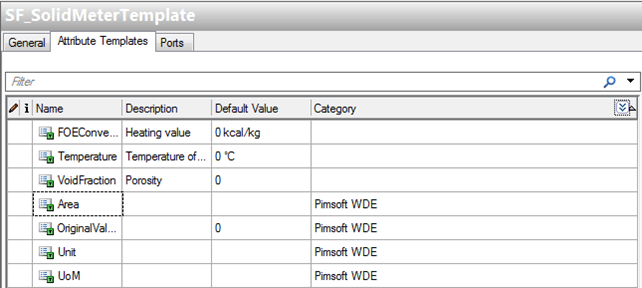
Based on the SF_SolidMeterTemplate, a meter has been configured with an Area attribute set to A or B and the Unit set to an integer.
Sigmafine Model, SF_SolidMeter Template
| Name | Description | Area | OriginalValue | Unit | UoM |
|---|---|---|---|---|---|
| Meter_A-1 | Meter1 AreaA | A | 0 ton | 1 | Tons |
| Meter_A-2 | Meter2 AreaA | A | 0 ton | 2 | Tons |
| Meter_A-3 | Meter3 AreaA | A | 0 ton | 2 | Tons |
| Meter_A-4 | Meter4 AreaA | A | 0 ton | 2 | Tons |
| Meter_A-5 | Meter5 AreaA | A | 0 ton | 2 | Tons |
| Meter_B-1 | Meter1 AreaB | B | 0 ton | 1 | Tons |
| Meter_B-2 | Meter2 AreaB | B | 0 ton | 1 | Tons |
| Meter_B-3 | Meter3 AreaB | B | 0 ton | 1 | Tons |
| Meter_B-4 | Meter4 AreaB | B | 0 ton | 2 | Tons |
| Meter_B-5 | Meter5 AreaB | B | 0 ton | 3 | Tons |
| Meter_B-6 | Meter6 AreaB | B | 0 ton | 3 | Tons |
An AF Hierarchy
A hierarchy of AF Elements and attributes is used by the TreeView web part to build a tree menu and send it to the Pimsoft WDE Web Part parameters that are used to extract data from Sigmafine model. In this example, elements belong to the same AF database of the Sigmafine Model.
The structure is shown in the following figure:

Non-null attribute values are defined as is indicated in the following table.
Non-null Attribute Values
| Property Name | Where | Value |
|---|---|---|
| AFAdvancedListAttribute | All | SF_SolidMeterTemplate.MeasuredMass;SF_SolidMeterTemplate.Unit;SF_SolidMeterTemplate.OriginalValue;SF_SolidMeterTemplate.Area;SF_SolidMeterTemplate.UoM |
| AFAdvancedLock | All | \\<AFServer>\WDEExample\CaseResults|Lock |
| AFTimeRulePath | All | \ \<AFServer>\WDEExample\PlantModel\Mass |
| AFAdvancedRule | A | [\<AFServer>\ |
| AFAdvancedRule | B | [\<AFServer>\ |
| AFAdvancedSecurity | A | \\<AFServer>\ WDEExample \Meter_A-1 |
| AFAdvancedSecurity | B | \\<AFServer>\ WDEExample \Meter_B-1 |
| Area | A | A |
| Area | B | B |
| Sort | A | |
| Sort | B |
The characteristics of this configuration are:
- Two elements, “Meter_A-1” and “Meter_B-1”, are used as security templates for respective areas.
- Lock state affects all areas because AFAdvancedLock is the same in all branches
- When selecting the root “WDETree”, nothing will be extracted because AFAdvancedRule is null
- When selecting A or B branches, only AF elements based on SF_SolidMeterTemplate and with Attribute Area set to A or B respectively are extracted
- MeasuredMass, Unit, OriginalValue, Area and UoM attributes of SF_SolidMeterTemplate elements are selected
OsiSoft Tree View Web Part
As said before, our example WDE web page contains two web parts; an OSIsoft TreeView web part and its key configurations. The key configurations are provided in the following table.
TreeView Web Part Key Configurations
| Property | Value |
|---|---|
| Root Node Of Tree | \\<PISystem>\<AFDatabase>\WDETree |
| Default Selected Node | \\<PISystem>\<AFDatabase>\WDETree |
| PI Properties Template Node | \\<PISystem>\<AFDatabase>\WDETree |
Moreover, the web part is configured to provide parameters to the WDE Web Part via the SERVER connection.
Pimsoft WDE Web Part
The last WDE example component is the WDE Web Part. The key configurations for this web part are provided in the following table.
WDE Web Part Key Configurations
| Property Group | Property | Value |
|---|---|---|
| Graphical Properties | Case Label | Working Day: |
| Data Label | Data | |
| User Label | User: | |
| Buttons Labels | Save;Refresh;Lock | |
| Save Message Label | Are you sure you want to commit the following data? | |
| TimeRange Properties | Case Search Range Start | *-15d |
| Case Search Range End | * | |
| Sigmafine-AF Properties | Search string | AFAdvancedRule |
| Attribute List | AFAdvancedListAttribute | |
| Analysis setting | AFTimeRulePath | |
| Security setting | AFAdvancedSecurity | |
| Area setting | Area | |
| Sort | ||
| Group-By setting | $@UNIT | |
| Lock/Unlock setting | AFAdvancedLock | |
| Table Layout Properties | Column list | ElementName;X;Code;Left;R;120;S|ElementDesc;X;Meter; Left;R;500;S|UoM;X;UoM;Left;R;60;S|MeasuredMass;X; Value;Right;RW;120;N |
| Table Width / Height (in px) | 800 400 |
WDE Web Part Final Appearance
With the “A” branch selected, the final aspect of our example page displays as depicted in the following figure.
WDE Example - Final Appearance