Upload the Web Part to SharePoint
The first step in adding the Sigmafine WDE Web Part is to upload it to SharePoint.
To upload the web part to SharePoint:
Make sure you are logged into SharePoint as the site administrator.
Navigate to the parent site.
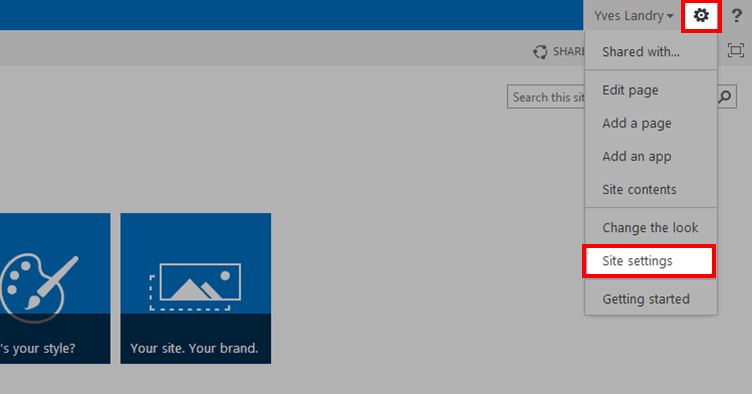
Click the Settings icon and select Site settings.
The Site Settings page opens.
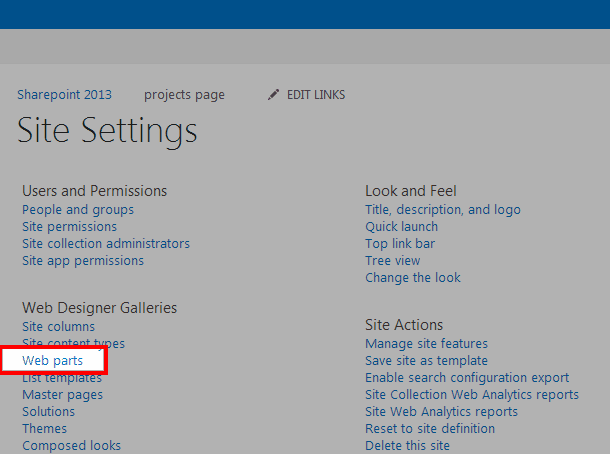
Under Web Designer Galleries, click on Web parts.
From the Web Part Gallery ribbon, select Documents.
Click on New Document.
Check the Pimsoft.WDE.TabularView web part.
Select the overwrite option.
Click the Populate Gallery button.
The WDE Web Part is added to your SharePoint server.
The second, and last, step in this process is to add the Web Part to a page. \Please see Add the Web Part to a Page for further instructions.