Items to Configure List
The content of the Items to Configure list is determined by the hierarchy context, and indicates whether you can configure access permissions for the entire PI AF hierarchy, a single database and containers, or a single container and single object.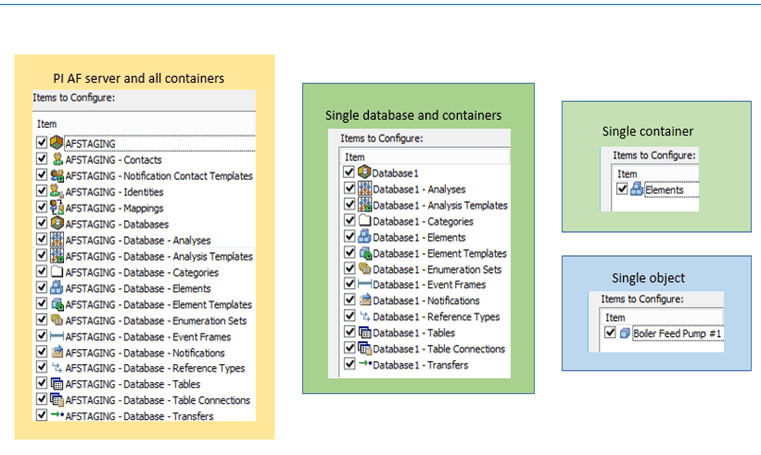
To configure access permissions for only some of the items, you can uncheck those you do not want to configure.
PI AF Access Rights
The following table describes the access permissions you can assign to PI AF identities for all objects in the PI AF hierarchy:
| Access Right | Security String Abbreviation | Definition |
|---|---|---|
| Read | r | Enables a user to view the object. Read security rights are required to view the object in client applications. |
| Write | w | Enables a user to create and modify an object. The exception is that event frames and transfers also require Write Data permission on the Element template from which they are created, and Cases require Write Data permission on the analysis in which they are contained. Additionally, if users do not have Write permission on the PI AF database, they cannot modify any object within the database, regardless of the specific permission on that object. |
| Read/Write | Enables a user to read and write to the associated object. When selected, automatically selects the Read and Write permissions. | |
| Read Data | rd | Enables a user to read non-configuration values from Attributes of elements (the Configuration Item property for an Attribute is unchecked). Additionally, this permission controls whether a user can see transfers created from a specific transfer Element template. Similarly, it controls whether a user can see Cases created in a specific analysis. |
| Write Data | wd | Enables a user to write non-configuration values to Attributes of elements (the Configuration Item property for an Attribute is unchecked). Additionally, this permission controls whether a user can create or modify event frames or transfers created from a specific transfer Element template. Similarly, it controls whether a user can create or modify Cases in a specific analysis. |
| Read/Write Data | Enables a user to read data and write data to the associated object. When selected, automatically selects the Read and Write Data permissions. | |
| Delete | d | Enables a user to delete an object. Delete security rights are required to delete an object, either directly or indirectly by removing it from other objects. |
| Execute | x | Enables a user to perform most actions on an analysis case.Note: The Execute permission is only used in Pimsoft SigmafineTM data reconciliations. PI Analysis Service does not use this permission. The Write permission is required to modify, run, and stop asset analyses. |
| Admin | a | Enables a user to modify the security settings, or owner, of an object. Administration security rights are required to force an Undo Check Out on an object that is checked out to another user, as well as to lock and unlock an event frame.Note: Users with the administration permission on the PI AF server object are granted all rights not only to the system, but to all objects within the system, including databases. |
| Subscribe | s | Enables a user to subscribe and unsubscribe to a notification. |
| Subscribe Others | so | Enables a user to subscribe and unsubscribe other users to a notification. |
| Annotate | an | Enables a user to annotate and acknowledge event frames.Note: This access right was added in PI AF 2016. After an upgrade from earlier server versions, objects with the Write Data (wd) access right are granted the Annotate access right automatically. Both client and server upgrades must use this new permission. |
Note: It is necessary to add the new user to the existing PI group so they are able to access the PI database (run Cases). Additionally, if the display model (PDI) is on a network drive, it is necessary to grant the user access so they are able to open the Model in ProcessBook.