PI AF Client
As you work with Sigmafine, the Model and AF database need to also be backed up.
Backing up the Sigmafine model, ProcessBook PDI file
The ProcessBook display is the graphical representation of the Sigmafine Model. It is very important to save the “.pdi” file in a safe location, and always keep it synchronized with the Sigmafine Model database.
Ad hoc back up of AF Database in PI System Explorer
An XML file can be generated including all the information needed to re-create the database (including cases).
Note: Ad hoc back up of the AF Database is not a recommended way to do a backup but rather, to only create a copy that may be used to send to Sigmafine tech support for troubleshooting.
To create the XML file:
Open PI System Explorer.
Select the Library plug-in.
Right-click on the name of the database and select Export.
The Export window opens.
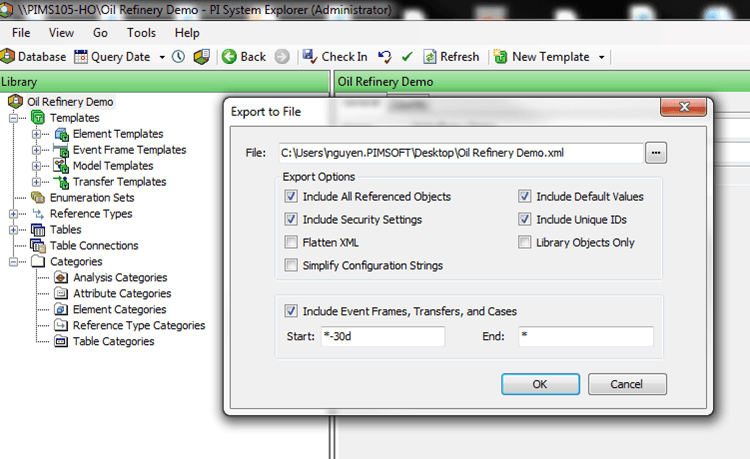
In this window there are different options you can select to generate the XML file.
Some of these options are:
- Include All Reference Objects
- Include Security Settings
- Flatten XML
- Include Default Values
- Include Unique IDs
With the exception of 'Flatten XML', we recommend that you check all the available options.
Note: The ‘Include Security Setting’ and ‘Include Unique IDs’ options should not be selected when the backup is intended to be used or restored in an external AF Server machine for test or troubleshooting (e.g. Sigmafine Tech Support).
Check the option to Include Event Frames, Transfers and Cases, and ensure that you enter the correct start time and end time (as shown in Figure 38).