Transfer Calculation Configuration
A Transfer Calculation analysis is configured as part of a Sigmafine based model. The elements of this model are based on the Sigmafine element templates.
The Pimsoft Transfer Calculation Analysis Rule requires a set of control parameters that must be set in the Transfer Calculation Configuration window, under the Control Params tab, to allow the application to run properly.
The Pimsoft Transfer Calculation analysis is configured using the Sigmafine Client tool (PI System Explorer).
You can graphically configure the Pimsoft Transfer Calculation analysis by using the Sigmafine Client tools, Transfer Calculation Configuration window.
The following tables provide the parameters, along with their respective descriptions, found under each of the tabs in the Transfer Calculation Configuration window.
Control Parameters
The Control Params tab includes a set of control parameters that allow the 'Collect Input' phase of the transfer calculation to apply some business rules, in order to drive the 'Run' phase of the balance analysis.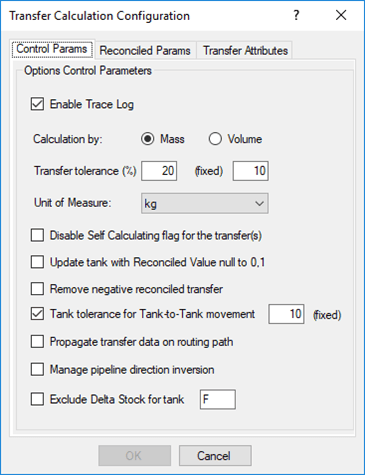
The following table provides descriptions for each of the parameters found under the Control Params tab.
Control Params tab - parameters
| Parameter | Description |
|---|---|
| Enable Trace Log | Checkbox: When selected, the transfer calculation detailed logging is enabled. |
| Calculated by | Allows you to set the transfer calculation mode by either 'Mass' or by 'Volume.' |
| Transfer tolerance | Parameters that are used to assign a tolerance to the transfers that are calculated by element.(%) - indicates the Relative Volume/Mass tolerance assigned to the transfer.(fixed) - indicates the Absolute Volume/Mass tolerance assigned to the transfer.EXAMPLE: For a transfer calculated using the source tank delta stock, the assigned tolerance would be:Transfer Tolerance (fixed) + Transfer Tolerance (%) * Tank Delta Stock |
| Unit of Measure | The Unit of Measure for the Tank quantity, according to the Calculation type by Mass/Volume. |
| Disable Self Calculating flag for transfer(s) | When transfer quantity cannot be determined by an element (tank or meter), the transfer will be set as self-calculated.However, if this check box is checked, the transfer measured quantity is set to zero with a tolerance assigned according to the configured Transfer Tolerance. |
| Update tank with Reconciled Value null to 0,1 | When this parameter is selected, the tank stock is set to 0.1 whenever the tank stock is zero or a bad value. This configuration parameter is meaningful when composition tracking is applied to IMM, in order to avoid the accounting of empty composition in the involved tank. |
| Remove negative reconciled transfer | If this check box is checked, it allows for the removal of negative reconciled transfers, by promoting the reconciled quantity to zero. |
| Tank tolerance for Tank-to-Tank movement | If this check box is checked, when tank to tank transfers are in place, it allows the assignment of a tolerance to the source or destination tank, in order to guarantee a certain freedom to the reconciliation. |
| Propagate transfer data on routing path | If this check box is checked, when transfers are created according to a routing path, it allows propagation of the first transfer reconciled data on the transfers belonging to the same routing path. |
| Manage pipeline direction inversion | This check box is only meaningful if the composition tracking is used by IMM. In such cases, if a pipeline direction inversion is detected, the composition packet sequence is reverted, when this check box is checked. |
| Exclude Delta Stock for tank | If this check box is checked, it excludes the use of the tank delta stock for specific tanks having the name starting with the configured prefix. In such cases, the quantity of the transfers starting or ending with this tank are determined in a different way (e.g. using a meter or setting the transfer as self-calculated). This configuration is generally used when a business rule requires the exclusion of a specific tank (e.g. tanks that are self-calculated – the stock is not available since only the reconciled quantity is calculated). |
Reconciled Parameters
The Reconciled Params tab includes a set of parameters that allow you to configure the elements attribute names used by the Analysis Reconciliation.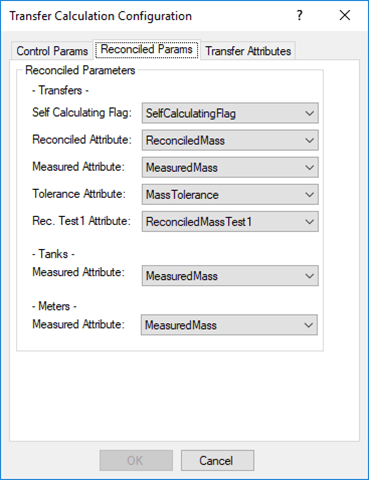
The following table provides descriptions for each of the parameters found under the Reconciled Params tab.
Reconciled Params tab - parameters
| Parameter | Description |
|---|---|
| Transfers | |
| Self Calculation Flag | An attribute (type = Boolean) that is used by the balance analysis to establish if a transfer is self-calculated. |
| Reconciled Attribute | An attribute (type = Double) in which the balance analysis stores the reconciled quantity of the transfer. |
| Measured Attribute | An attribute (type = Double) that contains the measured quantity of the transfer. |
| Tolerance Attribute | An attribute (type = Double) that contains the measured tolerance of the transfer. |
| Rec. Test1 Attribute | An attribute (type = Double) that contains the output Test1 index of the transfers calculated by the balance analysis. |
| Tanks | |
| Measured Attribute | An attribute (type = Double) that contains the measured quantity of the tank. |
| Meters | |
| Measured Attribute | An attribute (type = Double) that contains the measured quantity of the meters. |
Transfer Attributes
The Transfer Attributes tab includes a set of parameters that allow you to configure the transfer input and output attribute names to be used by the Transfer Calculation.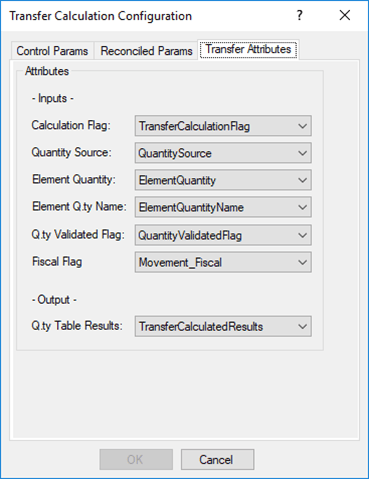
The following table provides descriptions for each of the parameters found under the Transfer Attributes tab.
Transfer Attributes tab - parameters
| Parameter | Description |
|---|---|
| Inputs | |
| Calculation Flag | An attribute (type = Boolean) used by the analysis to determine whether to include or exclude a transfer in the transfer calculation. |
| Quantity Source | A transfer attribute (type = String) that contains the calculation type required by the transfer. |
| Element Quantity | A transfer attribute (type = Double) that contains the progressive quantity calculated for the transfer. |
| Element Qty Name | A transfer attribute (type = String) that contains the name of the element used to calculate the transfer. |
| Qty Validated Flag | No longer used. |
| Fiscal Flag | A transfer attribute (type = Boolean) used to determine if the transfer is fiscal. |
| Outputs | |
| Qty Table Results | A transfer attribute (type = Anything) used to store the transfer calculated results. |