IMM_Params table
The IMM_Params table stores the configuration parameter of the IMM Server.
Default Dates
This section defines the default date and time settings used in transfer searches and when creating new transfers.
| Parameter Name | Description |
|---|---|
| DefaultSearchStartDateOffset | Specifies the date offset for the default start date in transfer searches. |
| DefaultSearchStartTime | Specifies the time applied to the default end date when searching for transfers. |
| NewTransferDefaultEndDateOffset | Specifies the date offset for the default end date of a new transfer. |
| NewTransferDefaultEndTime | Specifies the time for the default end date of a new transfer. |
| NewTransferDefaultStartDateOffset | Specifies the date offset for the default start date of a new transfer. |
| NewTransferDefaultStartTime | Specifies the time for the default start date of a new transfer. |
Date Offsets are relative to the current date and time. For example, a value of -2d means 2 days before the current date.
Example
DefaultSearchStartDateOffset = -2d
DefaultSearchStartTime = 00:00:00
NewTransferDefaultEndDateOffset = 0d
NewTransferDefaultEndTime = 00:00:00
NewTransferDefaultStartDateOffset = -1d
NewTransferDefaultStartTime = 00:00:00
In this example, when searching for transfers, the default start date will be set to 2 days before the current date at 00:00:00 time. When creating a new transfer, the default start date will be set to 1 day before the current date at 00:00:00 time, and the default end date will be set to the current date at 00:00:00 time.
The user can modify these default values in the Transfer Manager interface when searching for transfers or creating a new transfer.
Meter Settings
This section defines the attributes used to retrieve meter data for transfer calculations. They are essential for accurate measurement and calculation of transferred quantities in the IMM system using a meter.
| Parameter Name | Description |
|---|---|
| MeterDensityAttribute | Defines the meter's attribute containing the density. |
| MeterVCFAttribute | Defines the meter's attribute containing the Volume Correction Factor. |
| MeterVolumeAttribute | Defines the meters's attribute containing the Volume. |
Meter Density Usage
Meter Density attribute is used when the density of the transfer is retrieved from a meter. See Get Density button in Transfer Manager - Density From option = Meter
Meter VCF Usage
Meter VCF attribute is used when the Volume Correction Factor of the transfer is retrieved from a meter. See Get VCF button in Transfer Manager - VCF From option = Meter.
Meter Volume Usage
Meter Volume attribute is used to calculate the average density of input and output streams to/from a node. See Get Density button from Source Node or Destination Node in Transfer Manager.
Settings
Tank Settings
This section defines the attributes used to retrieve tank data for transfer calculations. They are essential for accurate measurement and calculation of transferred quantities in the IMM system using a tank.
| Parameter Name | Description |
|---|---|
| TankDensityAttribute | Defines the tank's attribute containing the density. |
| TankVCFAttribute | Defines the tank's attribute containing the Volume Correction Factor. |
| TankVolumeAttribute | Defines the tank's attribute containing the Volume. |
Tank Density Usage
Tank Density attribute is used when the density of the transfer is retrieved from a tank. See Get Density button in Transfer Manager - Density From option = Source/Destination Tank.
Tank VCF Usage
Tank VCF attribute is used when the Volume Correction Factor of the transfer is retrieved from a tank. See Get VCF button in Transfer Manager - VCF From option = Source/Destination Tank.
Tank Volume Usage
Not used at this time.
Transfer Colors
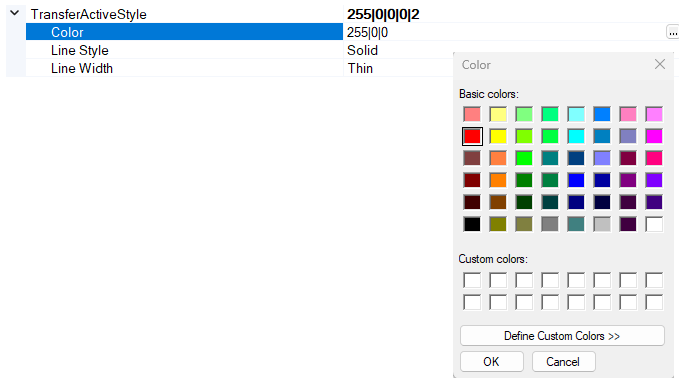
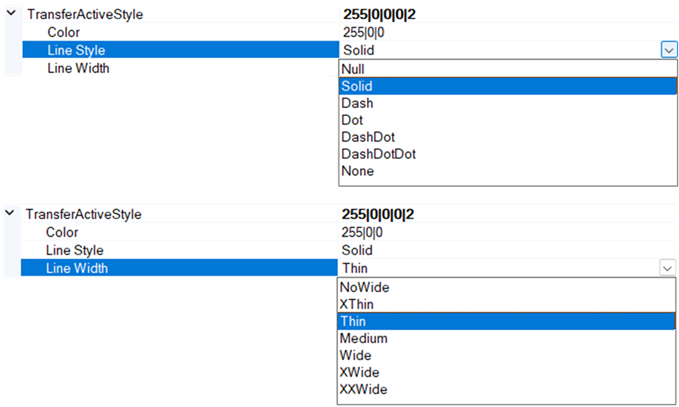
This section defines the visual properties (color, line style, and line width) for different transfer statuses displayed on screen.
| Parameter Name | Description |
|---|---|
| TransferActiveStyle | The style applied to ACTIVE transfers. |
| TransferApprovedStyle | The style applied to APPROVED transfers. |
| TransferClosedStyle | The style applied to CLOSED transfers. |
| TransferPlannedStyle | The style applied to PLANNED transfers. |
| TransferValidatedStyle | The style applied to VALIDATED transfers. |
Using the IMM Configuration application, you can modify these parameters to customize the appearance of transfer lines based on their status.
Transfer Management
This section defines various parameters that control the behavior and features of transfer management within the IMM system.
| Parameter Name | Description |
|---|---|
| AllowClosedTransferEditing | The style applied to ACTIVE transfers. |
| AllowCloseTransferInFuture | True / False If enabled, it allows you to close a transfer by setting the end time in the future. This feature is not enabled by default. |
| AllowTransferToFromProcessUnit | True / False If enabled it allows IMM to create a transfer to or from a process unit. This feature is not enabled by default. |
| ButtonMulti | True / False Indicates whether the 'Bulk Load' button is visible. This setting is no longer used in SFHub. |
| DefaultCreationTransferType | String. Allowed values are: PLANNED, ACTIVE, CLOSED. Specifies the default status assigned to new transfers in the transfer creation window. Users can change this value using the Status drop-down. |
| DefautOwner | String. Allowed values are according to the SF_OwnerTable Specifies the default owner assigned to new transfers in the transfer creation window. Users can change this value using the Property Owner drop-down. |
| DefautQuantitySource | Indicates the default Quantity Source selection, when a new transfer is created. Allowed values are: By Volume, By Mass, By Element or By Calculation. |
| EditTransferAttributeList | List of trasfer attributes (separated by the pipe characer) that can be modified in the transfer edit window. |
| EnableFeasibilityChecksGravitational | Enable/disable the feasibility check of a gravitational movement |
| EnableFeasibilityChecksMaterial | Enable/disable the compatibility check of the transfer material |
| EnableFeasibilityChecksMaterialGroup | Enable/disable the compatibility check of the transfer material group |
| EnableFeasibilityChecksQualityStatus | |
| EnableFeasibilityChecksRoutingPath | |
| EnableMaterialFormChecks | |
| ExcludeActivationCheckCurrentDay | If set to "true", it allows the transfer to be activated in the past days. |
| ForceCompatibility | Applies to function that returns the compatibility of the Element source and destination. |
| IMM_RecalcModel | |
| IMM_TankCalcModel | |
| IMMTransferFiscalAttribute | The transfer attribute containing the fiscal flag |
| IsRecalcEnabled | |
| MaxActivationDelay | Maximum activation delay in minutes. |
| RecalcServerSide | |
| TransferDensityAttribute | The transfer attribute name where the density is recorded. |
| TransferDensityCalculationMethodAttribute | The transfer attribute name where the density calculation method is recorded. |
| TransferMassAttribute | The transfer attribute name where the mass is recorded. |
| TransferVCFAttribute | The transfer attribute name where the Volume Correction Factor is recorded. |
| TransferVCFCalculationMethodAttribute | The transfer attribute name where the VCF calculation method is recorded. |
| TransposingNegativeTransfers | If set to true, it allows you to get the transfer quantity according the tank delta stock transposing the sign. Whenever a destination element in transfer creation decreases in quantity, this negative delta will be attributed to the transfer as well. If false, the absolute value of the tank delta stock is assigned to the transfer. |
User Interface
This section defines various parameters that control the behavior and features of the IMM user interface.
| Parameter Name | Description |
|---|---|
| AttributeBlendingListGrouping | The Transfer Attribute to be used for the blending grouping aggregation in the Transfer List Table (i.e. BlendingID). |
| AttributeTransferListGrouping | The Transfer Attribute to be used for the batch grouping aggregation in the Transfer List Table (i.e. BatchID). |
| EnableTransferListGrouping | True/False Enable or disable the transfer list grouping. |
| IMM_TankCalcModel | Sigmafine model used for the Transfer Calculation -plug-in. |
| LockStatusCombo | True/False. Lock or unlock the transfer status drop-down when editing a transfer. Lock the transfer status drop-down when you want to force the IMM workflow. |
| TankTrendEnabled | True/False. Enables or disables the display of tank trend plots in the user interface. This parameter applies only to the old IMM client for PI Processbook. |