Change Material
The Change Material feature allows you to modify the service material of the selected tank.
To modify the service material:
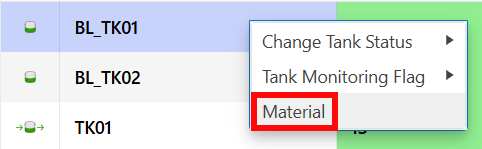
Right-click on the tank for which you want to change the service material, and select Material.
Tank Change Material window opens.
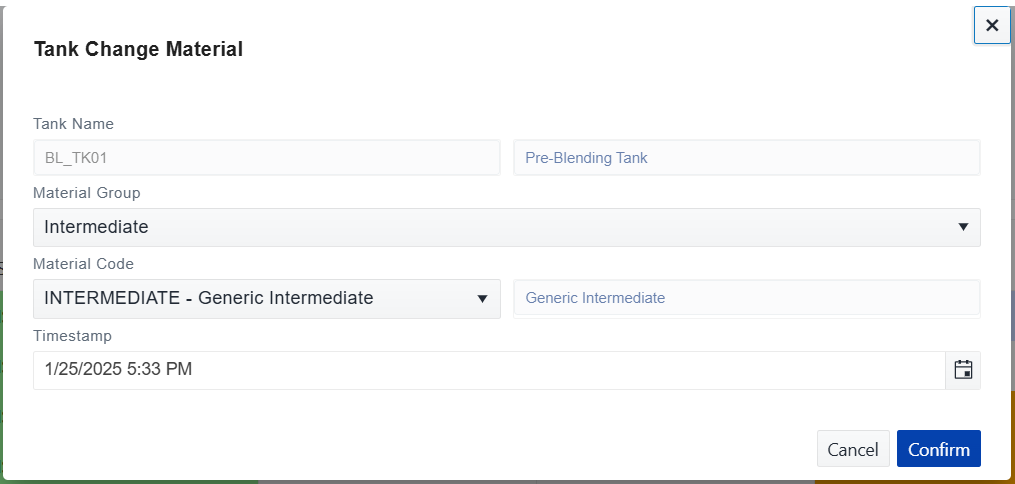
The Tank Change Material window contains four inputs:
Tank code: This input contains the tank name, which is not editable. The tank description displays beside this box.
Material Group: This input is the classification of the material by group. To change the Material Group, click on its dropdown and select the group you want.
Material Code: This input is the material in the tank.To change the Material Code, click on its dropdown and select the material you want.
noteWhen changing both the Material Group and Material Code, you must first select the new group so that the correct choices appear in the Material Code list.
Timestamp: This input is the timestamp of when the material was changed.
- Click the Confirm button to save your selection(s) and close the window.