Connection Operators
Connection operators are used to retrieve elements connected to one referred by the expression. They can only be used within an SFHub Visualizer search, and requires that a Sigmafine Case is selected.
The following table describes the supported Connection operators.
| Operator | Description |
|---|---|
>> | All elements connected in output. |
<< | All elements connected in input. |
|> | All connected elements, i.e. all elements connected in input and all elements connect in output. |
If the connected element is a flow, then the connected meters will be retrieved also, if any.
The simplest way of using Connection operators is to add the operator at the end of a Boolean expression. If the Boolean expression result is true, the result will be the list of connected elements.
Example
Test1 > 10 >>
If the Boolean (conditional) expression is true, the result will be the list of all elements connected in output.
Connection operators can also be used for more complex search.
Complex Search Example
[material]='H2O' >> test1 > 0
The >> Connection operator splits the expression string into two
expressions that will be evaluated in cascade. The evaluation sequence
will be:
- Select all the elements that have an attribute whose value is of type 'table' and which contain a row with the "material" column equal to the string 'H2O'.
- Select all elements connected in output (for each element that satisfied the previous condition).
- Select all elements which have an attribute whose name contains 'Test1' and whose value is greater than zero.
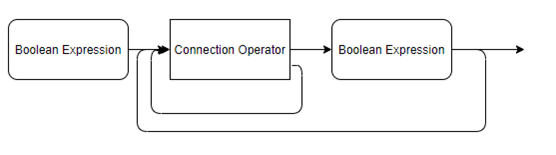
There is no limitation to using cascaded Connection operators. A Boolean expression in between two Connection operators is optional.
The following graph depicts the overall syntax (notice that the special operator is not in the graph)
Connection operators syntax graph