Sigmafine Balance Table
This table, named SF_SigmafineBalance, contains the available balances that can be selected in the Sigmafine Balance Analysis rule configuration. The table defines the basis of the analysis (UOMClass) and stores the default Attribute names for the analysis.
The table has the following column format.
SF_SigmafineBalance Table Column Format
| Column | Description |
|---|---|
| Parameter Name | The configuration settings names. |
| [Balance Name] | The parameter settings for the balance. A new column is added for each new balance basis. |
SF_SigmafineBalance Table Format
| Parameter Name | Description |
|---|---|
| UOMClass | UOM class name. |
| InventoryMeasurementAttribute | Inventory Measurement Attribute |
| MeterMeasurementAttribute | Meter Measurement Attribute |
| MeterToleranceAttribute | Meter Tolerance Attribute |
| TransferMeasurementAttribute | Transfer Measurement Attribute |
| TransferToleranceAttribute | Transfer Tolerance Attribute |
| InferredStatusAttribute | Inferred Status Attribute |
| ReconciledResidualAttribute | Reconciled Residual Attribute |
| ReconciledCorrectionAttribute | Reconciled Correction Attribute |
| ReconciledMeasurementAttribute | Reconciled Measurement Attribute |
| ReconciledToleranceAttribute | Reconciled Tolerance Attribute |
| ReconciledSolvabilityAttribute | Reconciled Solvability Attribute |
| ReconciledImbalanceAttribute | Reconciled Imbalance Attribute |
| ReconciledInfluenceAttribute | Reconciled Influence Attribute |
| ReconciledTest1Attribute | Reconciled Test1 Attribute |
| ReconciledTest2Attribute | Reconciled Test2 Attribute |
| ReconciledVarianceAttribute | Reconciled Variance Attribute |
| ReconciledTest3Attribute | Reconciled Test3 Attribute |
| ReconciledTest4Attribute | Reconciled Test4 Attribute |
| InventoryToleranceAttribute | Inventory Tolerance Attribute |
| ObjectStatusAttribute | Object Status Attribute |
| InventoryMaximumCapacityAttribute | Inventory Maximum Capacity Attribute |
| FlowMaximumRateAttribute | Flow Maximum Rate Attribute |
| TransferMaximumRateAttribute | Transfer Maximum Rate Attribute |
| InventoryMinimumCapacityAttribute | Inventory Minimum Capacity Attribute |
| FlowMinimumRateAttribute | Flow Minimum Rate Attribute |
| TransferMinimumRateAttribute | Transfer Minimum Rate Attribute |
| InventoryOpeningMeasurementAttribute | Inventory Opening Measurement Attribute |
| ConstraintFlagAttribute | Constraint Flag Attribute |
| HeatExchangerTubeReconciledImbalanceAttribute | Heat Exchanger Tube Reconciled Imbalance Attribute |
| HeatExchangerTubeReconciledVarianceAttribute | Heat Exchanger Tube Reconciled Variance Attribute |
| HeatExchangerTubeReconciledTest3Attribute | Heat Exchanger Tube Reconciled Test3 Attribute |
| HeatExchangerTubeReconciledTest4Attribute | Heat Exchanger Tube Reconciled Test4 Attribute |
| HeatExchangerTubeReconciledResidualAttribute | Heat Exchanger Tube Reconciled Residual Attribute |
| HeatExchangerShellReconciledImbalanceAttribute | Heat Exchanger Shell Reconciled Imbalance Attribute |
| HeatExchangerShellReconciledVarianceAttribute | Heat Exchanger Shell Reconciled Variance Attribute |
| HeatExchangerShellReconciledTest3Attribute | Heat Exchanger Shell Reconciled Test3 Attribute |
| HeatExchangerShellReconciledTest4Attribute | Heat Exchanger Shell Reconciled Test4 Attribute |
| HeatExchangerShellReconciledResidualAttribute | Heat Exchanger Shell Reconciled Residual Attribute |
An example table, built for the Sigmafine Demo Model is shown in Figure 209.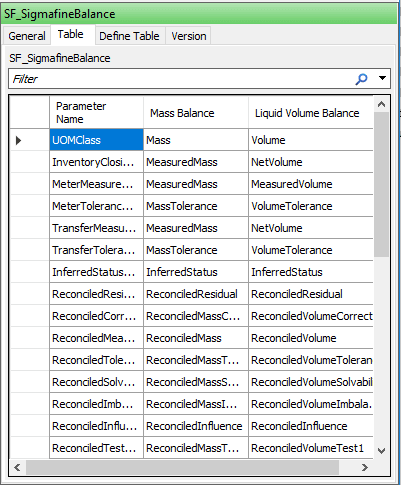
Editing the SF_SigmafineBalance Table
To edit the SF_SigmafineBalance table, you need to use the System Explorer, as table editing is not available in the Modeler.
To edit the table:
Open System Explorer.
In the navigation pane, click on Library.
In the Library tree view, click on the SF_SigmafineBalance table to select it.
To create a new basis for the Sigmafine Balance Analysis Rule, you must add an additional column to the table.
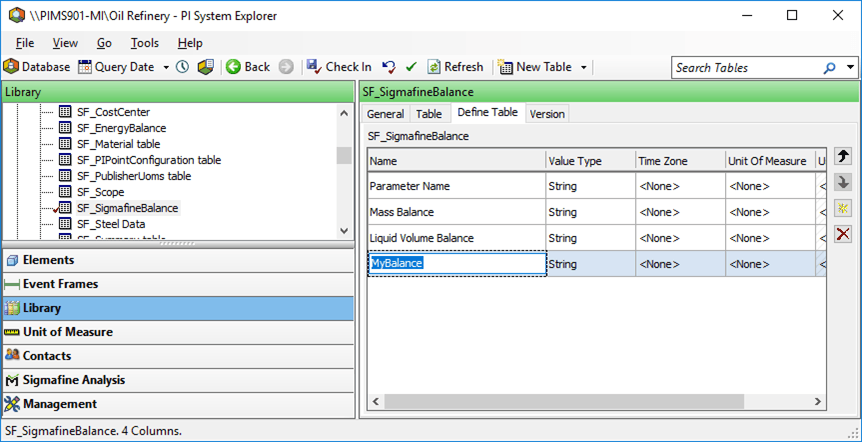
To add the column:
Click the Define Table tab.
Click the
 Add New Column button.
In the Name box, type a column header for the new column.
In the Value Type box, type String as shown in Figure 210.
Click the Table tab.
Enter the values a cording to the guidelines listed in the following table.
SF_SigmafineBalance Table Guidelines
Parameter Name Guidelines UOM Class Enter the unit-of-measure class. This needs to be a valid UOM class name that exists in the UOM database. *Attribute All Parameters with the suffix “Attribute”: Select the default Attribute name that will appear in the configuration dialog. *Category All parameters with the suffix “Category”: Name the Element category associated with that Element type.