Viewing Transfers in SF Modeler
Viewing transfers in a simple display during 'Run' mode is relatively easy. As shown In Figure 138, the transfer is indicated by the dark green arrow.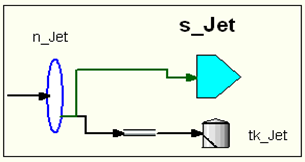
However, viewing transfers in a complex display, where it may not be obvious which elements are the source and destination, you can do the following:
Place the mouse pointer on the transfer.
Press and hold the left mouse button.
The arrow is highlighted, showing the elements connected by the transfer (as shown in Figure 139).

Alternatively, you can double-click the transfer to open the Connection window. and then click the Locate button to make the display shift to center and mark the element.
