Creating a New Child Element in a Model using System Explorer
If you need to add an Element to a Model that should only be available within that particular model, you create what is called a "child element" for the model.
To create a child Element using System Explorer:
Open System Explorer.
From the navigation pane, select Elements.
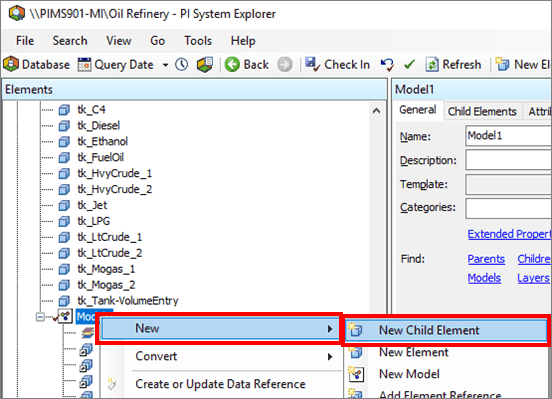
Right-click on the Model name and select New > New Child Element (as shown in Figure 167).
Choose the Element template on which to base the new child element.
Click OK to save your selection and close the Select Element Template window.
The System Explorer adds the new Element to the elements collection under the model. The Element does not appear under the main elements collection.
Note: At this time, child elements are not used by Sigmafine.