Configuring the Step
This section describes how to configure one step of the defined sequence of the execution. Basically, the sequence step is a configuration on one analysis rule that is to be executed in the order defined by the user. An example of the configuration form can be seen below (it is activated when ADDING or EDITING a step).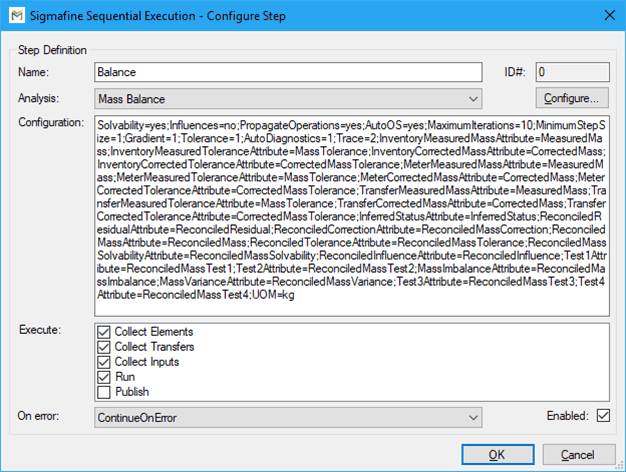
Each step has the following configuration features:
Configuration Step Features
| Button | Description |
|---|---|
| Name | This is a label/identifier provided by the user of the step. The name must be shorter than 256 characters, and it should not contain special characters (e.g. @+*#&%$|\/…etc). Underscores (_) and minus (-) are allowed |
| Analysis | The user is asked to select one of the registered Analysis Rule plug-ins from the Sigmafine system. |
| Configuration | This is the configuration string of the corresponding analysis. By selecting the button “CONFIGURE…” users can run the specific analysis rule configuration form, depending the selected analysis. Even the configuration is available for manual editing. Pimsoft suggests users configure the analysis through the configuration form. |
| Execute | This “CheckedListBox” allows the user to enable/disable which actions of each analysis should be run during the sequence execution. The step is executed when the step has the checkbox checked. If the checkbox is empty the action is disabled. By default, all actions are enabled. |
| On Error | This allows the user to select the behavior for managing the error code after each step execution. There are 3 possible options:Continue: Continues even in case of an errorStop: Stops the execution of the entire sequence in case of errorAsk: Asks the user if they want to continue or interrupt the sequence |
| Enable | This check enables/disables the execution of the step. By default, the execution is checked, which means it is ENABLED. If left unchecked, the step is disabled. |