Tanks Density Comparison to Default Density
This analysis rule indicates the in-service Tank elements with a density value different from the default value in the material table that is greater than the configured delta limit. The limit can be in percent of value or in engineering units. A limit of zero means that the limit has not been configured. The limit must be greater then zero for the limit to be used.
Any in-service tank with a density value change greater than the configured limit is reported to the Case log, which you can view in the Log tab of the Case Properties window. The output contains a list of meters in violation, and a description of the violation.
The following table lists a sample log output for this analysis.
Sample Log
| Time | Severity | Element | Attribute | Message |
|---|---|---|---|---|
| 9/1/2005 10:05 | ...REPORTING TANK DENSITY COMPARISON TO DEFAULT DENSITY | |||
| 9/1/2005 10:06 | Error | TankA | Material | Material code = MYMATERIAL not found in table SF_Material Table can not find default density for tank TankA |
| 9/1/2005 10:06 | Error | TankB | Density | Density: 1 (SG), Material Density:0.611231101511879 (SG) , Diff: 0.39, %Diff: 38.88 |
Analysis Method
- Collect a list of all tank elements in the current Case that satisfy the following criteria:
- Status Attribute value is IS (In Service)
- Using the material, get the default density from the Material Table.
- Using the density and default density values calculate the difference and the percentage change Compare these values to the configured thresholds .
- Write to the log section of the case. Report the violating tank information.
Configuration Using the Wizard
The configuration of the Tanks density comparison to default density is a selection of the General Gross Error Analysis Rule. You open the window for configuring the test (shown in the following figure) from the General Gross Error Analysis Rule Wizard.
Open the Gross Error Configuration window as described in Configuring - General Gross Error Analysis Rule.
On the Tanks tab, select Tanks density comparison to default density.
A Tanks density comparison to default density - Attributes window opens.
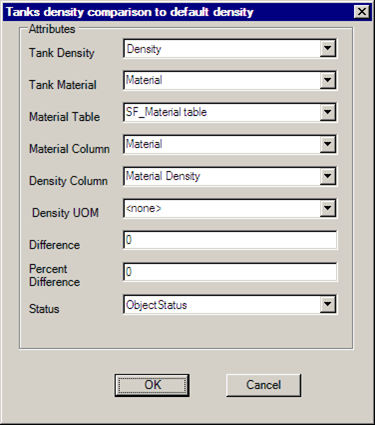
Select Attributes according to the following table:
Attributes
Selections Description Tank Density Density of material in the tank. The default is to Density. Tank Material Material in the tank. The default is Material Material Table Material table name. The default is SF_Material table. Material Column Name of the column in the material table that contains the material. The default is material. Density Column Name of the column in the material table that contains the default density. The default is MaterialDensity Density UOM The unit of measure of the density in the material table. Difference Enter a value in the engineering unit of the Density attribute. Percent Difference Enter a value in percent. Status Tank in/out of service status. The default is to ObjectStatus. Select a threshold value (set initially to zero unless changed) for the difference in the density between the two values.
Click OK to finish the configuration.
The text "CONFIGURED" displays next to the 'Tanks density comparison to default density' selection.
To run this test, see Running the General Gross Error Analysis.