Meters with Reconciled Statistics Exceeding Normal Values
This analysis rule includes the list of meter elements whose statistical results from the Sigmafine reconciliation solver are out of tolerance. In a Sigmafine model, out-of-tolerance measurements indicates incorrect tolerances, measurement error or missing /bad data.
The following table lists a sample log output for this analysis.
Sample Log
| Time | Severity | Element | Attribute | Message |
|---|---|---|---|---|
| 9/1/2005 10:06 | ...REPORTING METERS WITH RECONCILED STATISTIC EXCEEDING NORMAL VALUES | |||
| 9/1/2005 10:06 | Error | MeterA | ReconciledMassTest1 | ReconciledMassTest1= 14 > Threshold for Test1= 0 |
Analysis Method
- Collect a list of all meter elements in the current Case that satisfy the following criteria:
- Status Attribute value is IS (In Service).
- Sigmafine reconciliation solver statistical result Attributes are out of tolerance.
- Write to the log section of the case. Report the violation, meter Element name, and the Sigmafine reconciliation solver statistical values.
Configuration Using the Wizard
The configuration of the Meters with Reconciled Statistics Exceeding Normal Values is a selection of the Post-Reconciliation Gross Error Analysis Rule. You open the window for configuring the test (shown in the following figure) from the General Gross Error Analysis Rule Wizard.
Open the Gross Error Configuration window as described in Configuring - General Gross Error Analysis Rule.
On the Meters tab, select Meter with reconciled statistics exceeding normal values.
A Meter with reconciled statistics exceeding normal values - Attributes window opens.
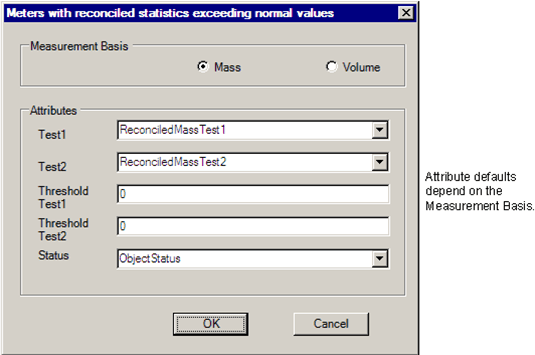
Select the measurement basis and the Attributes according to the following table:
Attributes
Selections Description Measurement Basis Select mass or volume measurement basis for comparison. Test1 Element Reconciled statistical Test1 value. The default is 'ReconciledMasstTest1' or 'ReconciledVolumeTest1', depending on mass or volume selection. Test2 Element Reconciled statistical Test2 value. The default is 'ReconciledMasstTest2' or 'ReconciledVolumeTest2', depending on mass or volume selection. Threshold Test1 Enter the threshold value for the measurement test value. Threshold Test2 Enter the threshold value for the measurement test value. Status Element in/out of service status. This defaults to 'ObjectStatus'. Click OK to finish the configuration.
The text "CONFIGURED" displays next to the 'Meter with reconciled statistics exceeding normal values' selection.
To run this test, see Running the General Gross Error Analysis.